Shabbos Zmanim Board for Chromecast (Flame)
A Shabbos Board (Shabbat board) for a kitchen TV: this week's parasha, candle lighting, zmanim and your own shul's minyan times, in Hebrew and English, for Shabbos and Yom Tov alike. Built on the free Hebcal API, in standard-library Python — no accounts and no cloud service of our own.
Accuracy: check before you rely on it. Times computed from Hebcal are known to differ by a minute or two from shul calendars, which use their own calculations, elevation and rounding. Calibrate the board from your own shul's calendar, use it only after checking that it matches your synagogue and location, and always follow your shul's published times and your rabbi.
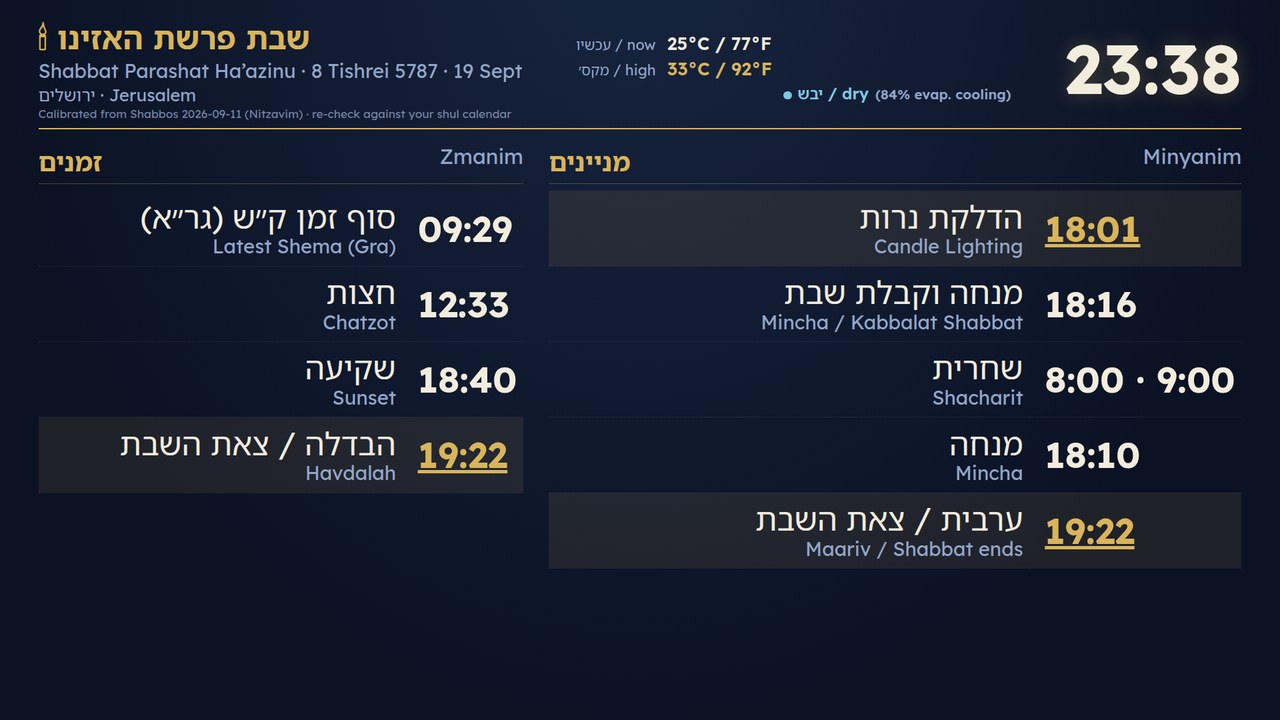
The board as it appears on the TV. Times shown are an example: it fills in your own location, your shul's minyan times and the weather where you live.
What is on the board: the parasha, candle lighting and havdalah, the zmanim, and your shul's minyan times, calibrated from one week of your shul's own calendar. Yom Tov gets its own blocks, including multi-day chagim; Israel and diaspora schedules both work. There is weather, an optional Hebrew word of the hour, and in Israel, Home Front Command alerts. An optional casting daemon puts the board on a Google Cast TV before Shabbos, keeps it there until havdalah, and can play music from your own collection.
Everything lives in [board/](board/), with its own README, example configuration, systemd user units and tests.
Switching appliances is a separate tool: Ember, the Shabbos device scheduler, puts a refrigerator into Sabbath mode and turns a hot plate, urn or lights on and off at times worked out for your location. It used to live in this repository.
Please test before relying on it
This is shared as-is, with no warranty. It works on my own computers, but your system, settings and software versions may differ, so please try it in a safe setting first. If something doesn't work, you can ask Claude (or another AI coding assistant) to look into it, and I'd appreciate hearing what you found and how you fixed it. You are also welcome to just let me know at support@veered.org, and I'll look into it.
Please read first
- Ask your rabbi. Automating appliances around Shabbat and Yom Tov raises halachic questions (for example, which devices may be switched by a timer, and whether Sabbath mode on your particular refrigerator is acceptable). These tools are a convenience that you set up before Shabbat. They do not make any arrangement permissible by themselves.
- Check the times. Times come from Hebcal for the location you configure. Your community may follow different customs or a printed calendar; you are responsible for the offsets you choose.
- No warranty. Networks, cloud services and devices fail. Do not rely on this software for anything safety-critical, respect the current ratings of smart plugs, and keep a manual fallback.
- Nothing is preconfigured. Neither tool has a default location. Both refuse to run until you set your own coordinates (or GeoNames id), time zone, and Israel or diaspora schedule.
Information for nerds: requirements and tests
- A device that stays on for all of Shabbos and Yom Tov on your local network: a computer that does not sleep, a home file server/NAS, or a Raspberry Pi or similar mini-PC. The board's server (and the casting daemon, if used) runs there, and the TV or browser points at it. Turn off sleep/suspend and automatic updates or reboots over Shabbos, keep it on wired power, and use the systemd units so it starts at boot. Casting happens from that device too, so set everything up and test it before Shabbos.
- Python 3.9 or newer
- Internet access to
hebcal.com - Linux with systemd for the provided unit files, or any system with cron
Information for nerds: tests
cd board && python3 -m unittest discover -s tests -vThe tests use local mock servers only. They do not contact Hebcal, Open-Meteo or any real device.
License
MIT, see LICENSE. Hebcal, Open-Meteo, Google Fonts, device vendors and other services these tools talk to have their own terms. Nothing from them is bundled here.