Shabbos & Yom Tov Device Scheduler (Ember)
Switches things on and off at the right moments for Shabbos and Yom Tov, worked out for your own town: a refrigerator into Sabbath mode before candle lighting, the hot plate or urn on and off, lights on a timer. You describe what you want once; it does it every week, including the weeks when Yom Tov runs into Shabbos.
It can show you exactly what it plans to do before it does anything:
$ python3 shabbat_scheduler.py --plan --days 10
Location: configured (Israel), candles 18 min, havdalah 40 min, next 10 days

fridge [smartthings]
  Fri 2030-01-04 15:32  on    (rule 0)
  Sat 2030-01-05 18:02  off   (rule 1)
Halachic and safety note. Ask your rabbi which devices may be switched this way and whether your appliance's Sabbath mode is acceptable. Switching a relay during Shabbat is intended here as a timer-style arrangement set up before Shabbat; this software makes no halachic determination. It comes with no warranty: clouds, networks and devices fail. Do not use it for safety-critical loads, respect every plug's current rating, and keep a manual fallback.
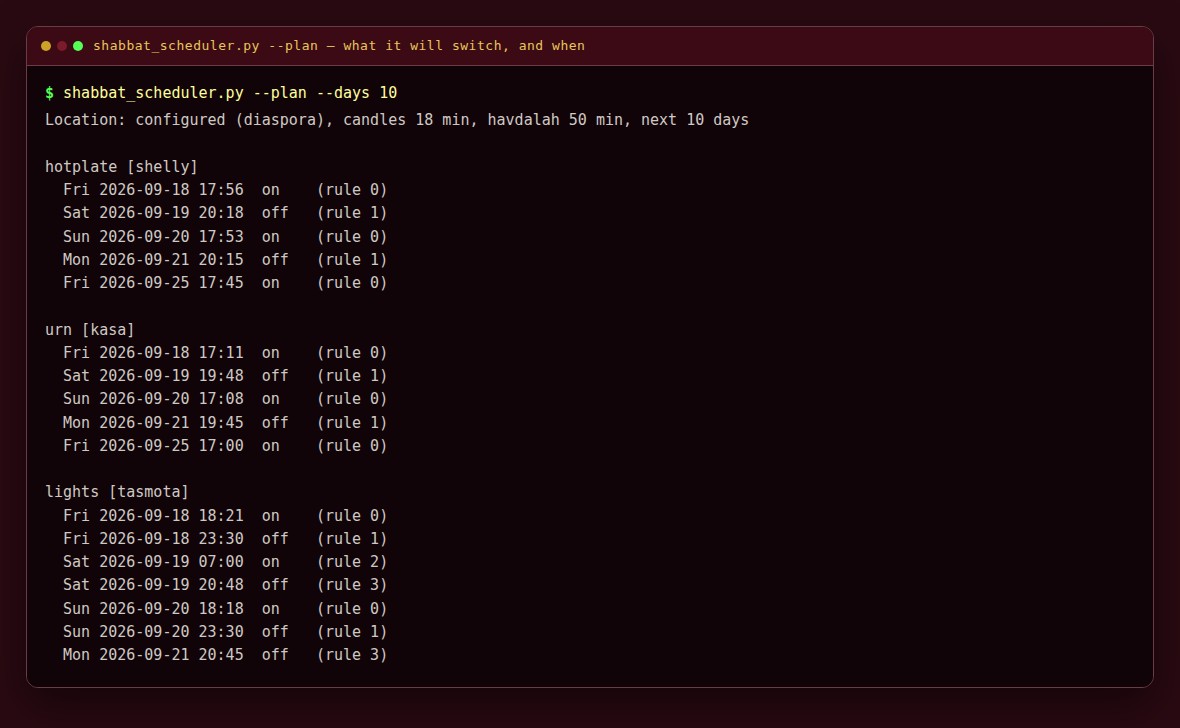
*--plan shows exactly what it intends to do, and switches nothing.*
Please test before relying on it
This is shared as-is, with no warranty. It works on my own computers, but your system, settings and software versions may differ, so please try it in a safe setting first. If something doesn't work, you can ask Claude (or another AI coding assistant) to look into it, and I'd appreciate hearing what you found and how you fixed it. You are also welcome to just let me know at support@veered.org, and I'll look into it.
The companion Shabbos Board puts the week's times on a kitchen TV. The two are separate; either works on its own.
Information for nerds: how it works
Hebcal's candle-lighting and havdalah times are merged into windows: one Shabbat, one Yom Tov, or several consecutive days of both (a two-day Yom Tov running into Shabbat is a single window). Each device has rules; a rule is an action at an offset from an event in each window:
event | When |
|---|---|
candle_lighting | first candle lighting of the window (every = true: each candle lighting inside it, e.g. the second night of Yom Tov) |
havdalah | end of the window (Hebcal havdalah = sunset + havdalah_minutes) |
end_sunset | sunset on the last day of the window |
clock | a fixed local time = "HH:MM" on the days of the window, strictly inside it. days = "all" (default), "erev", "first_day" or "last"; weekdays = ["fri", "sat"] to restrict |
Rule options: offset ("-60m", "+1h30m", "20s", or whole minutes), action (usually "on"/"off"), only (any, shabbat, yomtov, shabbat_without_yomtov), and catch_up: how late the action may still be sent if the computer was off or the device unreachable (default 15m). Use a long catch_up for things that should still happen late (Sabbath mode on) and a short one for things that should not (a hot plate).
If several actions for one device are due at once, only the latest is sent. Failed actions are retried (retries, retry_delay); after the last attempt a notification is sent.
Supported devices
| Device | Driver | Notes |
|---|---|---|
| Samsung refrigerators and ovens with SmartThings Sabbath mode | smartthings, capability = "samsungce.sabbathMode" | Only models whose SmartThings device lists this capability. Check in the SmartThings API or CLI. |
| SmartThings plugs, switches, dimmers | smartthings (default capability = "switch") | |
| Anything in Home Assistant | homeassistant | Any service on any entity: switches, lights, scripts, buttons |
| Shelly relays and plugs | shelly | Local HTTP; Gen1 (/relay) and Gen2+ (Switch.Set), detected automatically |
| TP-Link Kasa plugs and strips | kasa | Legacy local protocol on port 9999. Newer firmware using KLAP authentication does not answer it; use Home Assistant's TP-Link integration for those. |
| Tasmota-flashed plugs | tasmota | Local HTTP Power On/Off |
| Node-RED, IFTTT, custom services | webhook | Any method, URL, headers and body per action |
| Anything with a command-line tool | command | Runs your program per action |
Other brands through Home Assistant
Home Assistant has integrations for many appliance and plug brands, for example GE Appliances (SmartHQ), LG ThinQ, Whirlpool, Bosch/Siemens Home Connect, Tuya/Smart Life, TP-Link Kasa/Tapo, Shelly, Meross, and Zigbee or Z-Wave switches. For plugs and switches these integrations generally provide switch entities that work with this scheduler.
A refrigerator's Sabbath mode is a different matter. It can be scheduled only if that brand's integration exposes it as an entity or service on your model, and support varies by brand, model, region and integration version. We have not verified any specific entity names. Look in Home Assistant under Developer Tools > States for an entity mentioning Sabbath (or Shabbat) mode before relying on it, and try it with --do while you watch the appliance.
Information for nerds: install, location, devices and everything else
mkdir -p ~/.local/share/shabbat-tools ~/.config/shabbat-tools
cp -r . ~/.local/share/shabbat-tools/scheduler/
cp config.example.toml ~/.config/shabbat-tools/scheduler.toml
chmod 600 ~/.config/shabbat-tools/scheduler.toml
$EDITOR ~/.config/shabbat-tools/scheduler.toml
python3 ~/.local/share/shabbat-tools/scheduler/shabbat_scheduler.py --plan
The config is TOML (Python 3.11+). A .json file with the same structure also works, including on older Python. More examples are in [examples/](examples/).
Location
[location]
tzid = "Asia/Jerusalem"      # always required
latitude = 31.778            # or: geonameid = ...
longitude = 35.235
israel = true                # false = diaspora (two-day Yom Tov)
candle_minutes = 18
havdalah_minutes = 40
(Jerusalem is only an illustration.) If candle_minutes is omitted the default is 18 outside Israel, 40 with jerusalem = true, and 15 elsewhere in Israel; communities differ, so set your shul's own figure (the board's calibration page shows it). Run the scheduler on a device that stays on for all of Shabbos and Yom Tov. Hebcal treats b=18 as "use the default", which in Israel becomes 20; the scheduler works around this so 18 means 18.
Secrets
Keep tokens out of the config file. Every driver accepts token_env (the name of an environment variable) or token_file (a file only you can read); password settings work the same way (password_env, password_file). With systemd, put KEY=value lines in ~/.config/shabbat-tools/scheduler.env (chmod 600); the units load it.
SmartThings
- Personal access token: create one at the SmartThings developer site with device read and execute scopes and set
token_env. SmartThings has announced that newly created personal access tokens expire after 24 hours; if yours does, use OAuth. - OAuth: create an API-only OAuth app with the SmartThings CLI (
smartthings apps:create), with scopesr:devices:*andx:devices:*and a redirect URI you control. Setauth = "oauth",oauth_client_id,oauth_client_secret_envandoauth_token_file, then runpython3 shabbat_scheduler.py --smartthings-login fridge --redirect-uri <uri>once. Tokens are refreshed and rotated automatically and stored with mode 600. (This flow is covered by mock tests only; please report problems.) device_idcomes from the SmartThings app orsmartthings devices.verify = true(default) reads the state back after the command.
Notifications
[notify]
command = ["notify-send", "Shabbat scheduler"]   # subject and body are appended

[notify.smtp]
host = "smtp.example.org"
port = 587
username = "me@example.org"
password_env = "SCHEDULER_SMTP_PASSWORD"
from = "me@example.org"
to = ["me@example.org"]
Running
Pick one:
- Service:
--runcatches up, then sleeps until each next action. ``bash cp systemd/shabbat-scheduler.service ~/.config/systemd/user/ systemctl --user daemon-reload && systemctl --user enable --now shabbat-scheduler loginctl enable-linger "$USER" - Timer:
--tickevery minute, exits immediately when nothing is due. ``bash cp systemd/shabbat-scheduler-tick.* ~/.config/systemd/user/ systemctl --user daemon-reload && systemctl --user enable --now shabbat-scheduler-tick.timer - Cron: see [
crontab.example](crontab.example).
A lock file prevents a tick and the service from acting at the same time; a state file in ~/.local/state/shabbat-tools/scheduler/ prevents double firing.
Other commands:
python3 shabbat_scheduler.py --plan --days 30      # no device is contacted
python3 shabbat_scheduler.py --do fridge on        # send one action now, to test
Tests
python3 -m unittest discover -s tests -vPlan computation (plain Shabbat, Yom Tov on Friday running into Shabbat, a diaspora two-day Yom Tov, Shabbat running into Sunday Yom Tov), catch-up, retries and notifications, the Hebcal request, and every driver against a local mock HTTP server or TCP socket. No real device or cloud API is contacted.
License
MIT. See LICENSE. Written with AI assistance (Claude).