USPTO Patent Center PDF and DOCX Fixer and Scanned-PDF Shrinker (Vermilion)
Four small tools for the files that come up in patent work: the drawings and Word files the USPTO's Patent Center will not accept, and the scans that are too big to file.
Disclaimer. These tools are not legal advice. Verify that every filing meets the current USPTO rules (37 CFR and the Patent Center requirements in force when you file) before you rely on the output.
| Tool | What it does |
|---|---|
[uspto-pdf](bin/uspto-pdf) | Patent Center rejected your drawings for page size. This puts every page on a proper Letter or A4 sheet, upright and inside the margins the rules require, with nothing blurred: drawings stay as sharp as they were. |
[uspto-docx](bin/uspto-docx) | Patent Center rejected your Word file ("fonts not recognized", "non-Latin script detected"). This swaps fonts that are not on the USPTO list for Times New Roman, removes stray Arabic/Hebrew/Chinese language tags, accepts tracked changes, deletes comments and strips protection and macros. The wording is not touched. |
[pdf-shrink](bin/pdf-shrink) | A scanned PDF is too big to file. This makes it about 45% smaller without throwing anything away, and checks that every page still looks exactly the same before it keeps the result. |
[img-shrink](bin/img-shrink) | A picture file is bigger than it needs to be. Same idea for JPEG and PNG images: smaller file, identical picture. |
All four leave the original file alone by default and write a new file next to it. Overwriting needs an explicit --in-place.
Before and after: slide-sized pages go in, Letter sheets with legal margins come out.
Please test before relying on it
This is shared as-is, with no warranty. It works on my own computers, but your system, settings and software versions may differ, so please try it in a safe setting first. If something doesn't work, you can ask Claude (or another AI coding assistant) to look into it, and I'd appreciate hearing what you found and how you fixed it. You are also welcome to just let me know at support@veered.org, and I'll look into it.
Information for nerds: installing them, and what every option does
Debian / Ubuntu / Pop!_OS:
sudo apt install python3 python3-pypdf python3-reportlab \
                 python3-pikepdf python3-pil python3-lxml poppler-utils fonts-dejavu-core
Then put the scripts on your PATH, for example:
install -m 0755 bin/uspto-pdf bin/uspto-docx bin/pdf-shrink bin/img-shrink ~/.local/bin/With pip instead of apt: pip install --user pypdf reportlab pikepdf pillow lxml. img-shrink also needs pip install --user mozjpeg-lossless-optimization pyoxipng.
Jbig2enc (needed by pdf-shrink)
pdf-shrink calls the jbig2 encoder from jbig2enc (Apache-2.0). It is not bundled here.
- Some distributions package it (
jbig2encon Debian, Fedora and others; checkapt search jbig2enc). - Otherwise build it from source:
bash sudo apt install build-essential autoconf automake libtool libleptonica-dev git clone https://github.com/agl/jbig2enc && cd jbig2enc ./autogen.sh && ./configure --prefix="$HOME/.local" && make && make install
Use a current checkout: older release tarballs do not build against Leptonica 1.83 and later, whose structures became opaque.
pdf-shrink looks for the encoder in this order: --jbig2 PATH, the PDF_SHRINK_JBIG2 environment variable, a jbig2/jbig2enc file next to the script, then jbig2 on PATH.
uspto-pdf
Patent Center accepts only Letter (8.5 x 11 in) or A4 pages. Drawings exported from presentation software come out at slide size (10 x 7.5 in), CAD and diagram tools export at drawing size, and scanners often produce Legal. All of those are rejected.
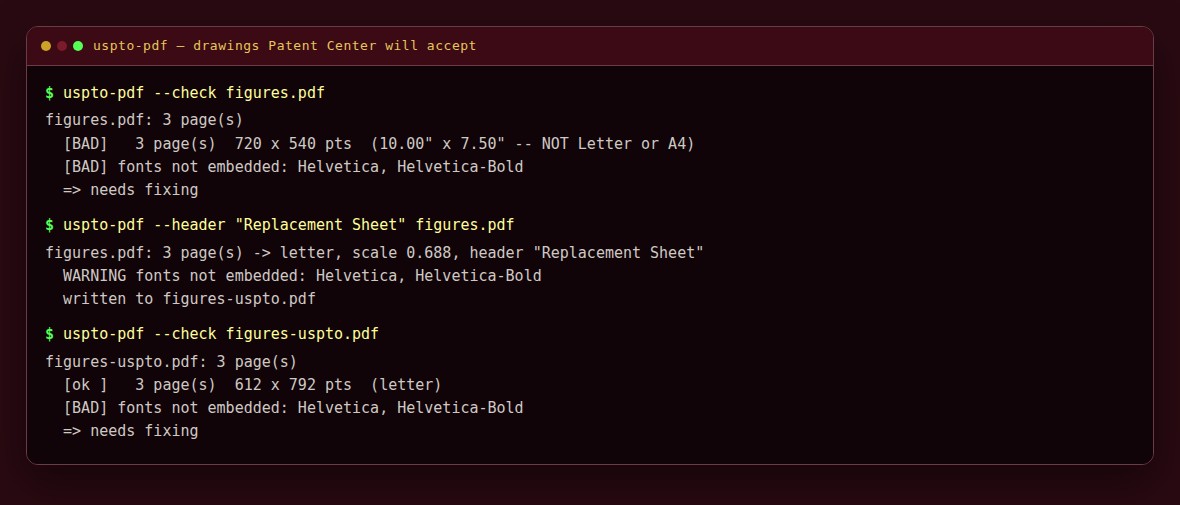
uspto-pdf places each page, upright and scaled, on a fresh portrait sheet inside the 37 CFR 1.84(g) margins (top 1 in, left 1 in, right 5/8 in, bottom 3/8 in). It honours /Rotate and CropBox, flattens away sticky-note annotations (which Patent Center renders inconsistently), and warns about fonts that are not embedded.
uspto-pdf --check figures.pdf                       # report only; exit 2 if non-compliant
uspto-pdf figures.pdf                               # writes figures-uspto.pdf
uspto-pdf --header "Replacement Sheet" figures.pdf  # amended drawings, 37 CFR 1.121(d)
uspto-pdf --size a4 -o out.pdf figures.pdf
uspto-pdf --in-place drawings/*.pdf                 # overwrite, keeping NAME.pdf.bak
Options: --valign top|center, --max-scale X (default 1.0, never enlarge), --keep-annots, --font FAMILY|PATH.ttf (header font, default DejaVu Sans), --suffix, --no-backup.
Notes:
--headerstamps every page unconditionally. Do not run it twice on the same file or the header is printed twice.- The header must use an embeddable TrueType font. If none is found the tool falls back to Helvetica and warns, because Patent Center flags non-embedded fonts. PDFs produced by other software can carry the same problem; one common fix is Ghostscript:
gs -o out.pdf -sDEVICE=pdfwrite -dEmbedAllFonts=true -dSubsetFonts=true -dPDFSETTINGS=/prepress in.pdf. - Filled AcroForm fields can disappear when pages are rebuilt. Flatten filled forms first (for example by printing to PDF) and check the result.
uspto-docx
Patent Center validates the specification, claims and abstract as a .docx and refuses fonts that are not on the USPTO's DOCX supported font list. The fonts it complains about are often ones nobody sees: LibreOffice's default Liberation Serif, and the fallback fonts its styles name for other scripts (Lohit, WenQuanYi, Noto, Miriam), together with Hindi, Chinese or Hebrew language tags that trigger "non-Latin script detected".
uspto-docx edits the package XML directly (it needs only lxml):
- every font that is not on the list becomes Times New Roman (
--fontpicks another listed font;--all-fontssets every font, keeping Symbol and Cambria Math) -- in runs, styles, numbering, the font table and the theme; list bullets drawn from Wingdings or OpenSymbol become a plain round bullet; - East-Asian and bidi language tags are removed;
- tracked changes are accepted (insertions kept, deletions and deleted rows dropped, a deleted paragraph mark joins the paragraphs) and track changes is switched off; comments are deleted;
- document protection, macros and embedded fonts are removed.
Hidden text and characters outside the Latin/Greek/symbol range are reported as NOTE lines, not changed. An old binary .doc, or a .docx saved as "Strict Open XML", is refused with a message saying how to re-save it.
uspto-docx --check spec.docx          # report only; exit 2 if anything needs fixing
uspto-docx spec.docx                  # writes spec-uspto.docx
uspto-docx -o fixed.docx spec.docx
uspto-docx --in-place *.docx          # overwrite, keeping NAME.docx.bak
Read the result through before filing: accepting tracked changes and deleting comments are real edits, even though the tool does not change any wording itself.
pdf-shrink
Patent documents, file wrappers and many journal scans are 300 dpi 1-bit page images compressed with CCITT Group 4. JBIG2 generic-region coding stores the same pixels in roughly half the space.
pdf-shrink scan.pdf                                  # writes scan.shrunk.pdf
pdf-shrink -r prior-art/ --output-dir prior-art-small/
pdf-shrink -r prior-art/ --dry-run --report measure.csv
pdf-shrink -r prior-art/ --limit 50 --dry-run        # random sample, projected savings
pdf-shrink -r prior-art/ --in-place --backup-dir ~/pdf-originals --jobs 4
Safety properties:
- Generic-region coding only. JBIG2 symbol ("text") mode can substitute look-alike glyphs, the cause of the well-known scanner digit-swap bug. It is never used, since these are often evidentiary documents.
- Render verification. The input and the candidate are rendered page by page with
pdftoppmat 300 dpi (--verify-dpi) and compared byte for byte. Page counts must match. Any difference is reported asFAILand the result is discarded. Pages are rendered one at a time, so temporary disk use stays small even for large-format sheets. - Only smaller results are kept. Files without CCITT images are skipped.
- Originals are kept. The default writes a new file.
--in-placerefuses to run without--backup-dir DIRor an explicit--no-backup, and refuses a backup directory that is inside the input tree or inside a cloud-synced folder (Dropbox, OneDrive, Nextcloud and similar). - Image dictionary flags such as
/Interpolateare preserved, and/Decodearrays are handled so images are not inverted twice. Both were real bugs that the render check caught during development.
Without pikepdf or poppler. On hosts where pikepdf will not build or poppler is missing, pdf-shrink falls back to pypdf for the PDF rewrite, Pillow or ImageMagick (magick/convert) to turn the decoded scans into bitmaps, and mupdf (mutool draw) or Ghostscript for the render check. The verification is the same either way. The pypdf path handles bare Group 4 streams only (the scanner and USPTO case). Force a backend with PDF_SHRINK_BACKEND=pypdf, PDF_SHRINK_BITMAP=magick|pil, PDF_SHRINK_RENDERER=pdftoppm|mutool|gs; PDF_SHRINK_DEBUG=1 prints what was picked.
Other options: --jobs N, --report CSV with --resume, --max-page-mp N to skip huge pages, --limit N [--seed S | --first]. --verify-scale N is faster but weaker (it cannot see a dropped /Interpolate); leave it off unless you accept that.
Large runs are CPU-heavy. Consider nice -n 19 and a modest --jobs.
img-shrink
img-shrink -r figures/ --output-dir figures-small/
img-shrink -r figures/ --in-place --backup-dir ~/img-originals
JPEGs are optimized losslessly (entropy coding only, DCT coefficients untouched) and PNGs are re-deflated. A result is kept only if the decoded pixels are identical and the file is smaller.
Tests
The tests generate synthetic PDFs (a slide-sized page, a Legal page, a rotated page with an annotation, and 1-bit scan-like pages stored as CCITT G4). No real documents are involved.
python3 -m unittest discover -s tests -vTests whose dependencies are missing (for example jbig2enc) are skipped. Point PDF_SHRINK_JBIG2 at an encoder binary to run the pdf-shrink tests.
License
MIT, see LICENSE. jbig2enc, poppler, pikepdf, mozjpeg and oxipng are separate projects under their own licenses and are not bundled.