Patent Flowchart Maker (Coral): steps in, filing-ready flowchart out
Coral turns a description, a claim, or a full claim set into a decision flowchart. Describe what the thing does, paste claims, type the steps, or write an indented outline; the tool places every shape and arrow, checks the sheet against the USPTO drawing rules (37 CFR 1.84), and exports a PDF with embedded fonts, an SVG, or a PNG at 300 or 600 dpi. A second preset makes the same chart for a website or a presentation.
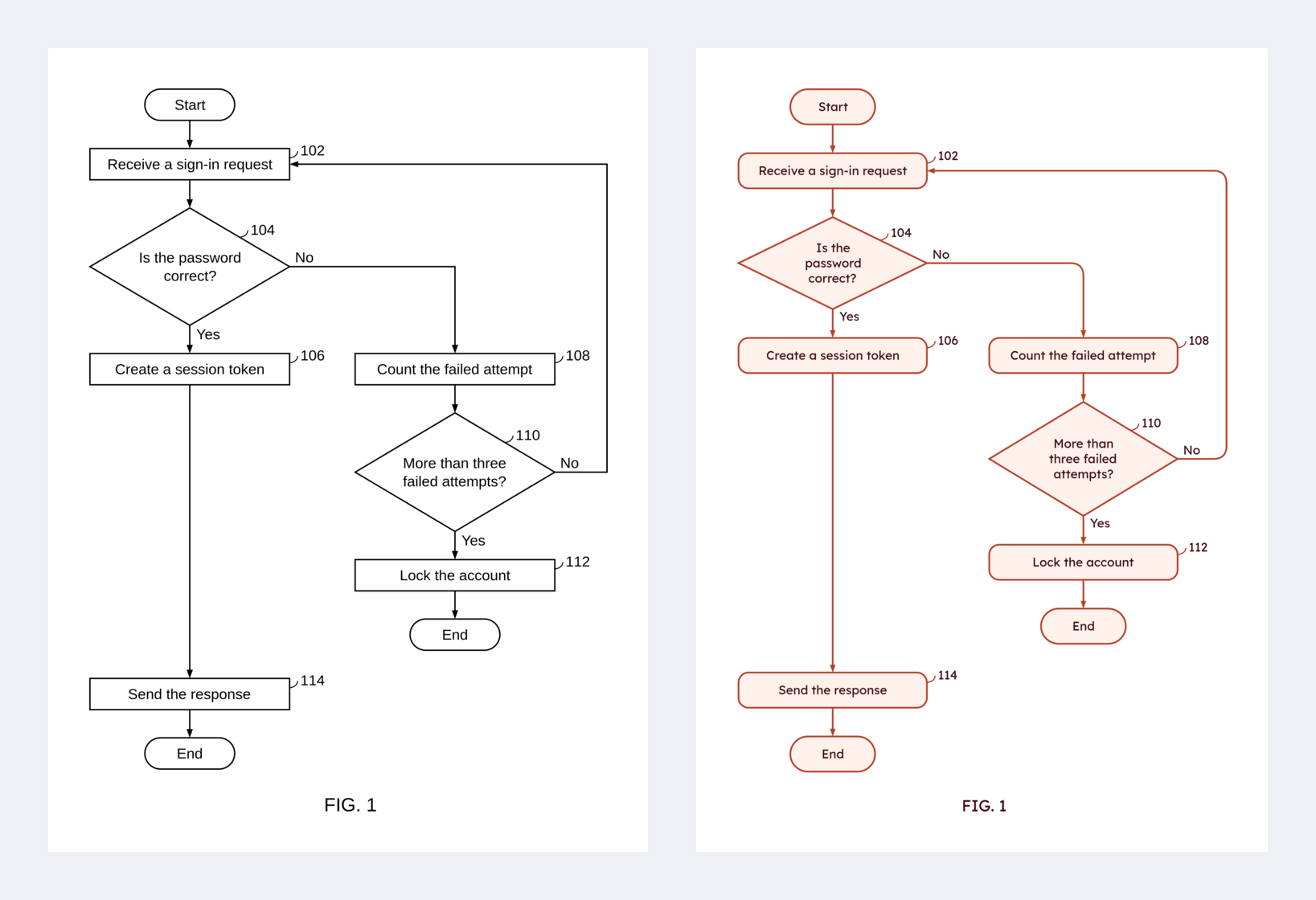
Try it: open index.html from any web server (python3 -m http.server). Nothing is uploaded; charts are kept in the browser and in the project files you save.
What it does
- Describe or paste: type what the process does in plain sentences, or paste one claim or the whole claim set, and press Make the flowchart.
- A description becomes steps; "If …, …; otherwise, …" becomes a decision with both branches; "go back to …" becomes a loop.
- A claim set gives one figure per independent method claim. Dependent claims are folded in: "further comprising" adds steps, and a "wherein" clause becomes a sub-step of the step it limits. "Determining whether …" becomes a diamond, and "in response to determining that …" becomes its Yes or No branch. Claim wording is kept, and no numerals are added.
- Optionally, Claude drafts the chart instead (tick the box and paste your own Anthropic API key). The text then goes to Anthropic under your key; otherwise nothing leaves the browser.
- Steps: add, edit, delete, reorder (buttons or drag), indent and outdent. Each step has its own shape: rectangle, rounded rectangle, diamond, oval, terminator, parallelogram, hexagon, circle.
- Decisions: a step ending in
?becomes a diamond; the rows indented under it are its branches (Yes / No, or any number of outcomes). - Loops:
-> 102sends the flow back (or ahead) to step 102, routed around the chart on the side with the fewest crossings. - Start / End terminators, and off-page connectors: type
(A)to continue on another sheet, or let a long chart break by itself onto circled letters. - Sub-steps: rows indented under a step are drawn as boxes inside it.
- Style: typeface, size, alignment, line weights, box padding and width, spacing, arrow line (straight, elbow, curved), solid or dashed, arrowhead shape and size, margins, paper. Save any combination as a preset; "USPTO formal" and "Website/presentation" are built in.
- Figures: several figures per project; "Duplicate figure" copies one as the start of the next and asks for the new figure number.
- Detailed Description text: starter sentences written from the chart with the numerals you chose ("At step 104, the method determines…").
- Undo / redo, autosave, project files (
.json).
USPTO compliance mode (on by default)
| Rule | What the tool does |
|---|---|
| Margins, 1.84(g) | One click sets top 2.5 cm, left 2.5 cm, right 1.5 cm, bottom 1.0 cm; smaller margins are flagged |
| Paper, 1.84(f) | Letter or A4 only |
| Black and white, 1.84(a)(1), (m) | No color, fill or shading |
| Lettering, 1.84(p)(3) | The size control stops where capitals are 0.32 cm high (13.5 pt in Liberation Sans) |
| View label, 1.84(u) | "FIG. X" with the X you type; a chart on several sheets gets 3A, 3B (editable) |
| Reference numerals, 1.84(p) | You type each numeral; the tool never assigns or renumbers them, and flags a numeral used twice |
| Sheet numbers | None added |
The checker lists every violation beside the drawing and again before an export. Switch compliance mode off to lift the limits.
Outline format
Start
102: Receive a sign-in request
104: Is the password correct?
    Yes:
        106: Create a session token
    No:
        108: Count the failed attempt
        -> 102
110: Send the response {parallelogram}
End
Files
engine.js (parsing, layout, routing, checks, description text; no DOM, node tests/engine.test.js), export.js (PDF through pdf-lib, PNG through canvas), app.js (the page), fonts/ (Liberation Sans, Serif and Mono, and Lexend, embedded in the PDF because Patent Center rejects fonts that are not embedded).
What it is not
It is not legal advice, and the checker covers the rules above, not all of 37 CFR 1.84. Review every drawing before filing.
Name
Coral: a red that grows by branching.
MIT License. Fonts are under the SIL Open Font License.