Pendant: patent and trademark docketing
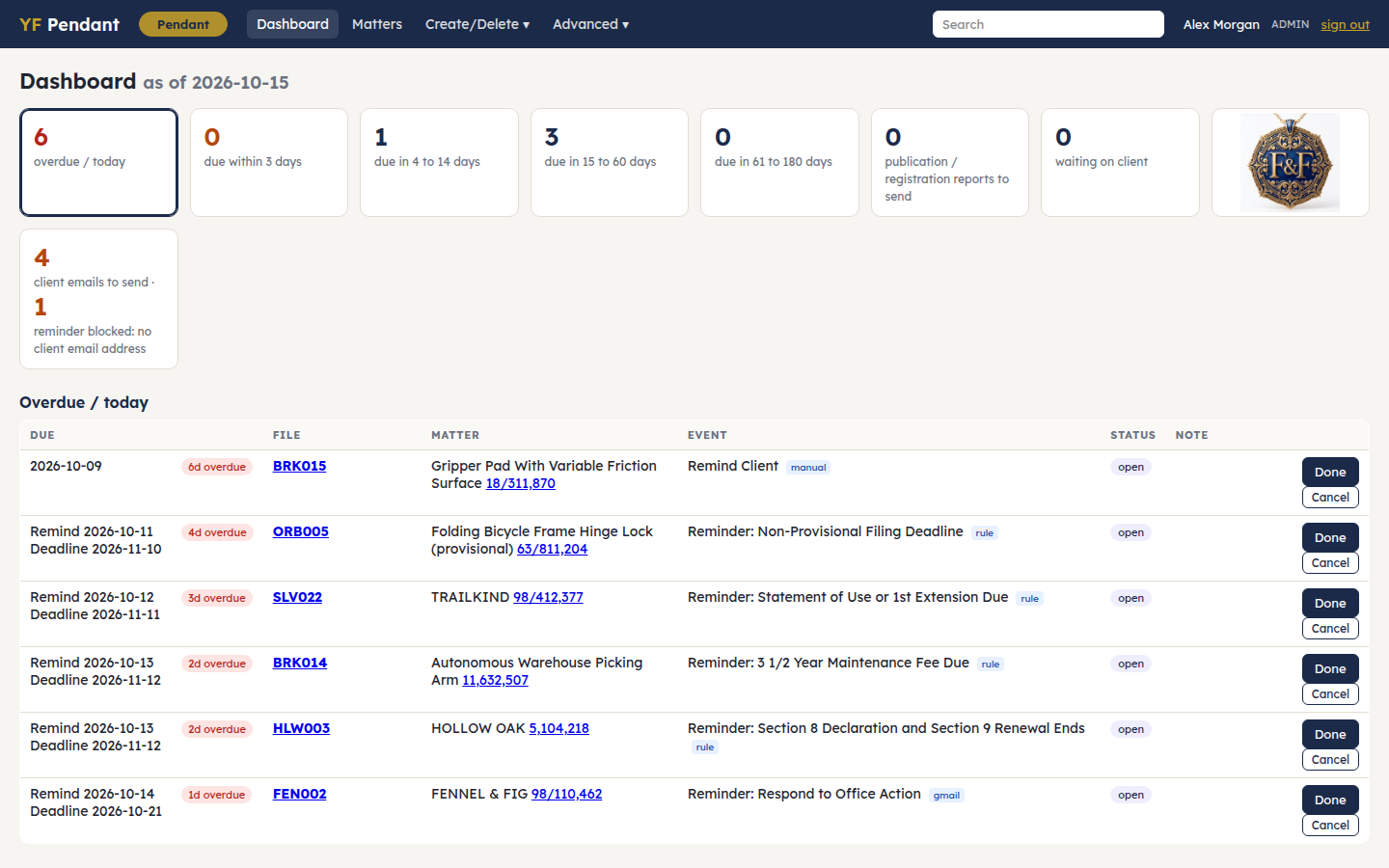
Docketing for a small patent and trademark practice. Pendant keeps every matter's deadlines, reads USPTO notices, proposes when a deadline has been met, and drafts the client emails and letters that go with each step. One PHP app with one SQLite file. It has no framework and no build step.
What it does
- Dashboard. Shows what is overdue and what falls due in the next 3, 14 and 60 days, plus the queue of proposed closures waiting for an admin to confirm.
- Matters. Search by file number, client, mark or title, serial or patent number. Each matter page shows its events, its USPTO correspondence, its reminders and a change log.
- USPTO rules. A table maps each document code to its deadline: Office Action responses, Statements of Use and extensions, Section 8/9/15, maintenance fees, PCT and foreign-filing dates. Dates roll past weekends and federal holidays per 35 USC 21(b).
- USPTO mail. Paste a Patent Center notification or a trademark notice and Pendant dockets it. You can also connect a Gmail mailbox (read-only) so it pulls them every hour. Receipts propose the deadline they satisfy as done.
- Live USPTO checks. These use TSDR and the Open Data Portal. The nightly sweep proposes closures and flags dead properties. Every closure is only proposed until an admin confirms it.
- Client emails. There is one template per event type. A template sends nothing until an admin approves it. Reminders are queued 30 and 7 days ahead and held until someone clicks Send.
- Letters. The filing report, patent issuance and trademark registration letters are filled into your own Word letterhead.
- Other. Client portfolio report (PDF), audit log, nightly backups, and a sign-in throttle.
- Optional. Matter folders in Dropbox, which Pendant indexes and saves Office Actions into.
Requirements
- PHP 8.1+ with the
pdo_sqlite,curlandmbstringextensions. - Optional:
- Python 3 with
python-docx pypdf reportlab pillow, for letters, USPTO forms and the client report. pdftotextandtesseract, for reading PDFs in matter folders.- Free USPTO API keys:
- TSDR: https://account.uspto.gov/api-manager/
- Open Data Portal: https://data.uspto.gov/apis/getting-started
Install
tar xzf pendant-.tar.gz && cd pendant- ./install.sh # checks requirements, writes config.php + firm.php, creates the database and your admin login ./run.sh # try it at http://127.0.0.1:8090
Then:
- firm.php sets your firm's name, phones, web sites, e-mail domains, USPTO customer number and signing attorney. These details appear in page titles, email signatures, letters and forms.
- config.php holds the USPTO API keys, more users (
role=adminorstaff), and per-user signatures. Leavemail_modeatoutbox(nothing is sent) until the templates are approved and you have tested a send. Then change it tolive. - Templates (Advanced → Templates) are seeded from one firm's actual wording. Read each one, edit it to suit you, and approve it.
- Letterhead.
templates/*.docxare plain letters with empty headers. Open each one in Word, add your letterhead and logo to the header, and keep the body's labels (Re:,Subject:,Dear,Sincerely,), because the fillers look for them.
Serving it
Point the web server's document root at web/. That folder holds only index.php and two images. The config, the database and the code stay outside it.
Use HTTPS. Pendant has its own sign-in, so it does not need HTTP auth.
Add the jobs to the crontab of the user that owns the folder:
30 5 * * * php /path/to/pendant/bin/nightly.php --email=you@example.com # USPTO sweep, reminders, morning report, backup 15 * * * * php /path/to/pendant/bin/hourly.php # Gmail intake, Dropbox index, receipts, Office Actions 0 6 * * * php /path/to/pendant/bin/heartbeat.php --email=you@example.com # e-mails you if a job did not run
Optional connections
- Gmail (USPTO notices). Copy
gmail/config.example.phptogmail/config.phpand fill it in. It needs an OAuth client with thegmail.readonlyscope. Then set'gmail_config' => __DIR__ . '/gmail/config.php'in config.php. - Dropbox (matter folders). Set
dropbox_rootsin firm.php. Then go to Advanced → Dropbox and paste the app key of a scoped Dropbox app you create (files.metadata.read, files.content.read, files.content.write). The connection uses PKCE, so no app secret is stored. - Coming from DocketTrak. Run
python3 bin/import_backup.py DocketTrakBackup.xlsx. The input is an Admin → Backup export. - Not included. The e-signature page and the "Download with Claude" Patent Center helper are separate apps. Their buttons show but do nothing until you set them up.
Your data
Everything lives in data/: the database, reports, attachments and Dropbox tokens. Keep that folder private and back it up. The nightly job writes copies to backup_dir.
Please test before relying on it
This is shared as-is, with no warranty. It works on my own computers, but your system, settings and software versions may differ, so please try it in a safe setting first. If something doesn't work, you can ask Claude (or another AI coding assistant) to look into it, and I'd appreciate hearing what you found and how you fixed it. You are also welcome to just let me know at support@veered.org, and I'll look into it.
License
MIT. The blank USPTO forms in templates/forms/ are U.S. government works; Lexend is under the SIL Open Font License.