Linux SMS and VOIP Phone App (Cherry)
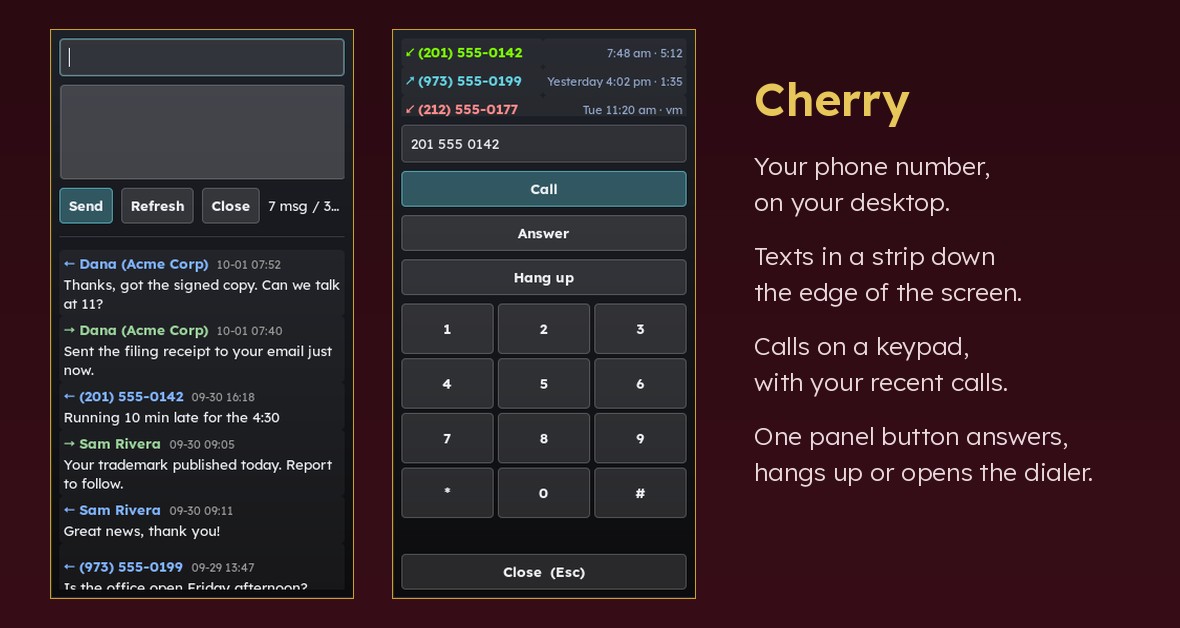
Your phone number, on your computer. Texts arrive in a narrow window at the edge of the screen, calls ring on the desktop, and one button on the panel answers them.
- Texting: a window down the right-hand edge, the conversation in it, and a box to type your reply.
- Calling: a keypad with your recent calls, and Call / Answer / Hang up. Numbers you have in your own contacts show up by name.
- One button on the panel: it answers a ringing call, hangs up a call in progress, or opens the keypad when nothing is happening.
- Clear sound on speakers, with the echo cancelling that open speakers and a desk mic need.
Which providers work
Calls work with any phone provider that speaks SIP — the standard nearly all of them speak — including voip.ms, Twilio, SignalWire, Telnyx, Callcentric, Flowroute, or your company's own phone system. You put your provider's login in a settings file.
Texts and call history need a provider this knows how to talk to:
| Backend | Send texts | Read texts | Call history | Needs |
|---|---|---|---|---|
voipms (default) | yes, 160 characters | yes | yes | voip.ms API login |
twilio | yes, 1600 characters | yes | yes, for Twilio numbers | Account SID and auth token |
signalwire | yes, 1600 characters | yes | yes, for SignalWire numbers | Space name, project ID and API token |
kdeconnect | yes, from your own mobile phone | no | no | An Android phone paired with KDE Connect, and kdeconnect-cli |
command | whatever your program does | A program you write (any other provider, or a server that holds the credentials) |
The kdeconnect backend needs no telephone provider at all: texts go out through your phone's own plan. It uses KDE's kdeconnect-cli (sudo apt install kdeconnect); the COSMIC KDE Connect applet does not include a command-line client. Replies arrive on the phone as usual.
Please test before relying on it
This is shared as-is, with no warranty. It works on my own computers, but your system, settings and software versions may differ, so please try it in a safe setting first. If something doesn't work, you can ask Claude (or another AI coding assistant) to look into it, and I'd appreciate hearing what you found and how you fixed it. You are also welcome to just let me know at support@veered.org, and I'll look into it.
Information for nerds: how it fits together
panel button / hotkey ── cosmic-phone-click ──┐
                                              ├── cosmic-phone-ctl ──► baresip ctrl_tcp (127.0.0.1:4444) ──► SIP (voip.ms)
cosmic-dial (window) ─────────────────────────┘                          │ events
                                                                          ▼
                    $XDG_RUNTIME_DIR/cosmic-phone.state ◄──── cosmic-phoned (user unit)

cosmic-sms / cosmic-dial history ── cosmic_phone.backend ──► voip.ms REST API (HTTPS)
Information for nerds: requirements, setup and settings
sudo apt install baresip python3 python3-gi gir1.2-gtk-3.0 gir1.2-gtklayershell-0.1 \
                 pulseaudio-utils libnotify-bin
# optional
sudo apt install playerctl ffmpeg     # audio ducking / merging call recordings
gir1.2-gtklayershell-0.1 is what anchors the windows to the screen edge. Without it they still work, but the compositor chooses where they appear.
Setup
1. Install
./install.sh # add --panel for panel buttons, --enable to start the unitsPrograms go to ~/.local/bin, the library to ~/.local/lib/cosmic-tools/phone, user units to ~/.config/systemd/user. Existing config files are never overwritten.
2. Texts and call history
Pick a backend (table above) and set backend = in phone.conf. Setup for each:
voip.ms
- voip.ms portal > Main Menu > SOAP and REST/JSON API.
- Enable the API and set an API password. This is separate from your portal login password.
- Add this machine's public IP to the allowed IP list.
cosmic-phone checkprints the address voip.ms sees (it fails withip_not_enableduntil the IP is allowed, so use a "what is my IP" service the first time). A home connection with a changing IP needs updating when the IP changes. - Make sure SMS is enabled on the DID (DID Numbers > Manage DIDs > edit > SMS/MMS).
- Fill in
~/.config/cosmic-tools/phone.secretsand keep itchmod 600:
ini api_username = you@example.com api_password = your-API-password
- Set
did =in~/.config/cosmic-tools/phone.conf, then runcosmic-phone check.
Twilio
- In the Twilio Console, copy the Account SID and Auth Token, and buy or port a number with SMS enabled. US numbers must be registered for A2P 10DLC before Twilio will deliver texts.
phone.secrets:
ini twilio_account_sid = ACxxxxxxxxxxxxxxxxxxxxxxxxxxxxxxxx twilio_auth_token = your-auth-token
phone.conf:backend = twilio,did =your Twilio number, andcountry_code =if you are not in North America (e.g.44). Then runcosmic-phone check.
SignalWire
- In your SignalWire Space, open API and copy the Project ID and an API token.
phone.secrets:
ini signalwire_project_id = xxxxxxxx-xxxx-xxxx-xxxx-xxxxxxxxxxxx signalwire_api_token = PTxxxxxxxx
phone.conf:backend = signalwire,did =your number, and under[signalwire]setspace =the NAME inNAME.signalwire.com. Then runcosmic-phone check.
KDE Connect (your own phone)
- Install KDE Connect on the desktop (
sudo apt install kdeconnect) and on the Android phone, pair them, and allow the SMS permission on the phone. phone.conf:backend = kdeconnect. If more than one device is paired, set[kdeconnect] device =to the ID shown bykdeconnect-cli -a.cosmic-phone checkshows the device it will use.didis not needed.
3. SIP sub-account and baresip (calls)
- voip.ms portal > Sub Accounts > Create Sub Account: a dedicated SIP login for this desktop. Point your DID's routing (or a ring group) at it.
- Copy
~/.baresip/accounts.exampleto~/.baresip/accounts,chmod 600, and replaceSUBACCOUNT,PASSWORDandSERVER(your voip.ms POP, e.g.newyork1.voip.ms). ~/.baresip/configcomes frombaresip/config.template. Notes:ctrl_tcp_listen 127.0.0.1:4444must stay on localhost. ctrl_tcp accepts unauthenticated dial/answer/hangup commands and defaults to0.0.0.0.- Do not load
stdio.so,cons.soorhttpd.sounder systemd. answermode=manualin the account means calls ring until you answer.- Start it:
sh systemctl --user enable --now cosmic-phone-baresip cosmic-phoned cosmic-phone-ctl status
4. Contacts (optional)
Export your address book as vCard and/or keep a CSV of name,number[,company], list them in [contacts], and build the lookup file:
cosmic-contacts-build --vcf ~/Contacts/export.vcf --csv ~/Contacts/fixes.csvCSV rows override vCard entries for the same number. Unknown NANP numbers show their state or province from the area code, never presented as a name. Re-run after changing the sources. The generated book is written with mode 600.
5. Panel buttons
COSMIC panel (recommended). ./install.sh --panel installs two pairs of desktop entries. The …Button.Phone / …Button.SMS entries are panel applets (X-CosmicApplet=true) that run cosmic-panel-button, which fires the matching …Action.* entry on a single click. Add the Button entries to a panel (COSMIC Settings > Desktop > Panel > Configure applets, or the plugins_wings / plugins_center list in ~/.config/cosmic/com.system76.CosmicPanel.Panel/v1/).
- Do not put the Action entries in the panel directly: a non-applet entry listed there is executed when the panel starts.
- Actions go through
cosmic-panel-launch, which resetsWAYLAND_DISPLAYto the session compositor. A GTK layer-shell window started on the panel's private socket can crash the panel. - Do not try to make these into GTK applets. COSMIC applets must be libcosmic clients.
cbar-style panels. panel/phone.1s.sh and panel/sms.1h.sh use the BitBar/Argos line format.
Hotkeys. Bind a key to cosmic-phone-click (answer / hang up / toggle dialer) and a modifier variant to cosmic-phone-alt (silence the ringer / hang up). In COSMIC Settings > Keyboard > Custom shortcuts, use the bare program path without arguments.
6. Echo cancellation (optional)
See aec/BUILD.md. In short: aec/build-aec.sh, then ./install.sh --with-aec, then restart PipeWire yourself.
Config reference (~/.config/cosmic-tools/phone.conf)
| Section / key | Default | Meaning |
|---|---|---|
phone.backend | voipms | voipms, twilio, signalwire, kdeconnect or command |
phone.did | (empty) | Your DID(s), comma-separated. The first sends SMS; all mark inbound calls. |
phone.did_label | DID | Shown in the SMS window title |
phone.sms_days | 30 | History window for SMS |
phone.recent_calls | 3 | Calls shown in the dialer |
phone.country_code | 1 | Added to national numbers for twilio / signalwire. Numbers typed with + are used as-is. |
voipms.api_url | https://voip.ms/api/v1/rest.php | API endpoint |
voipms.http_method | GET | GET or POST |
voipms.timezone | -1 | voip.ms numeric timezone for returned timestamps |
voipms.timezone_is_utc | true | Convert returned timestamps from UTC to local time |
voipms.timeout | 30 | Seconds |
voipms.user_agent | cosmic-tools-phone/… | Must not be Python-urllib/… (voip.ms returns 403) |
twilio.api_url | https://api.twilio.com | API endpoint |
signalwire.space | (empty) | Your SignalWire space name |
signalwire.api_url | https://SPACE.signalwire.com/api/laml | API endpoint |
kdeconnect.cli | kdeconnect-cli | Path to KDE's command-line client |
kdeconnect.device | (auto) | Device ID when more than one is paired |
command.command | (empty) | Program for backend = command |
baresip.config_dir | ~/.baresip | Where cosmic-aec-guard edits config |
baresip.ctrl_host / ctrl_port | 127.0.0.1 / 4444 | Must match ctrl_tcp_listen |
aec.enabled | false | Let cosmic-aec-guard switch baresip to the AEC nodes |
aec.sink / aec.source | cosmic_aec_sink / cosmic_aec_source | Node names |
audio.duck_during_calls | false | Pause players and mute other apps during calls |
recording.dir | (empty = off) | Where baresip's sndfile legs are merged |
contacts.vcf / contacts.csv | (empty) | Sources for cosmic-contacts-build |
contacts.book | ~/.local/share/cosmic-tools/phone/contacts.json | Built lookup file |
panel.solo_family | (empty) | Other pidfile-toggled windows to close when a phone window opens |
Environment overrides: COSMIC_PHONE_CONF, COSMIC_PHONE_SECRETS, COSMIC_PHONE_LIB.
The command backend
[phone]
backend = command
[command]
command = ~/bin/my-phone-backend
The program is called as sms-list --days N, sms-send --to NUMBER --text TEXT or calls-recent --limit N, and prints JSON (shapes in lib/cosmic_phone/backend.py, working stub in examples/command-backend.sh). One use is keeping API credentials off the desktop: command = ssh -o BatchMode=yes myserver ./phone-api.py.
Programs
| Program | What it does |
|---|---|
cosmic-sms | SMS window (toggle) |
cosmic-dial | Dialer window (toggle); closes itself after a call ends |
cosmic-phone | CLI: check, sms list, sms send, calls recent |
cosmic-phoned | Call-state daemon (user unit) |
cosmic-phone-ctl | dial N / accept / hangup / status to baresip |
cosmic-phone-click | Panel / hotkey action: answer, hang up, or toggle dialer |
cosmic-phone-alt | Secondary hotkey: silence ringer (call goes to voicemail) or hang up |
cosmic-phone-silence | Mute / restore baresip's ring stream |
cosmic-audio-duck | Optional: quiet other audio during calls |
cosmic-aec-guard | baresip ExecStartPre: use AEC nodes if present, else fall back |
cosmic-contacts-build | Build the contacts lookup file |
cosmic-call-merge | Optional: merge recording legs into one stereo file |
cosmic-panel-launch | Start a GTK window safely from a panel button |
Things worth knowing
- baresip's ctrl_tcp serves one client at a time. A new connection silently drops the old one, so every
cosmic-phone-ctlcommand briefly knockscosmic-phonedoff the event stream.cosmic-phonedreconnects, and while it believes a call is up it re-checkscallstatover its own connection and forcesIDLEif baresip has had no call for 10 s. Do not add another persistent ctrl_tcp client. - Layer-shell windows have no titlebar. Every window closes on Esc / Ctrl+W, has a Close button, and closes when launched again. Never change the keyboard mode to
EXCLUSIVE; that is a compositor-wide grab with no way out. - Sends are never retried automatically. A timed-out send may still have been delivered, and a duplicate text is worse than an error. Full errors are logged to
~/.cache/cosmic-tools/phone/*.errors.log. - voip.ms SMS is limited to 160 characters per message; longer text is refused rather than split. Twilio and SignalWire accept up to 1600.
- **voip.ms
dispositiondoes not reveal missed calls**: calls answered by voicemail reportANSWERED. The dialer marks a call as voicemail when the CDR's call log or description mentions voicemail. - Muted ring streams can stick. PipeWire remembers mute per application, so a silenced ring could make the next call's audio start muted.
cosmic-phone-silence restoreruns on every call transition and unmutes baresip streams by identity.
Security notes
phone.secretsholds your API password in plain text. Keep itchmod 600; the tools warn when it is readable by others. Consider a voip.ms API IP allowlist as mandatory, not optional.- With
http_method = GET(the documented form) credentials are sent in the query string over HTTPS. They are never included in error messages or logs.POSTkeeps them out of the URL. - The SIP password lives in
~/.baresip/accounts; keep that directory700and the file600. ctrl_tcphas no authentication. Bind it to127.0.0.1only, and do not enable baresip'shttpd/consmodules on0.0.0.0.- Caches (
~/.cache/cosmic-tools/phone) contain message text and numbers and are created600. The contacts book is created600. - Call recording is off by default and legally regulated in many places.
Tests
tests/run-tests.shRuns bash -n and py_compile on everything, and unit tests for the voip.ms, Twilio/SignalWire, KDE Connect and command backends against a local mock HTTP server (no real API calls), the command backend, secrets permission checks, netstring framing, and vCard/CSV contact import from fake data.
License
MIT (see the top-level LICENSE).
Information for nerds: conventions
- The installer is per-user: it writes to
~/.local/bin,~/.local/share/cosmic-toolsand~/.config/cosmic-tools, never to system directories, and needs nosudo. - Any step that edits a COSMIC config file makes a timestamped backup under
~/.config/cosmic-tools/backups/first. - Configuration files are plain text with comments.