Linux Mouse Button Remapper (Rufous)
Map a mouse's extra buttons to clicks, keys, shortcuts, commands and hold-to-shift layers on Wayland. mouse-remap grabs one physical mouse through evdev and re-emits its events through uinput virtual devices, so it works under COSMIC or any other compositor. X11 tools such as xbindkeys and xinput do nothing on Wayland.
Behaviour comes from a small TOML profile. A profile for the Evoluent VerticalMouse D is included, as is a commented template for any other mouse.
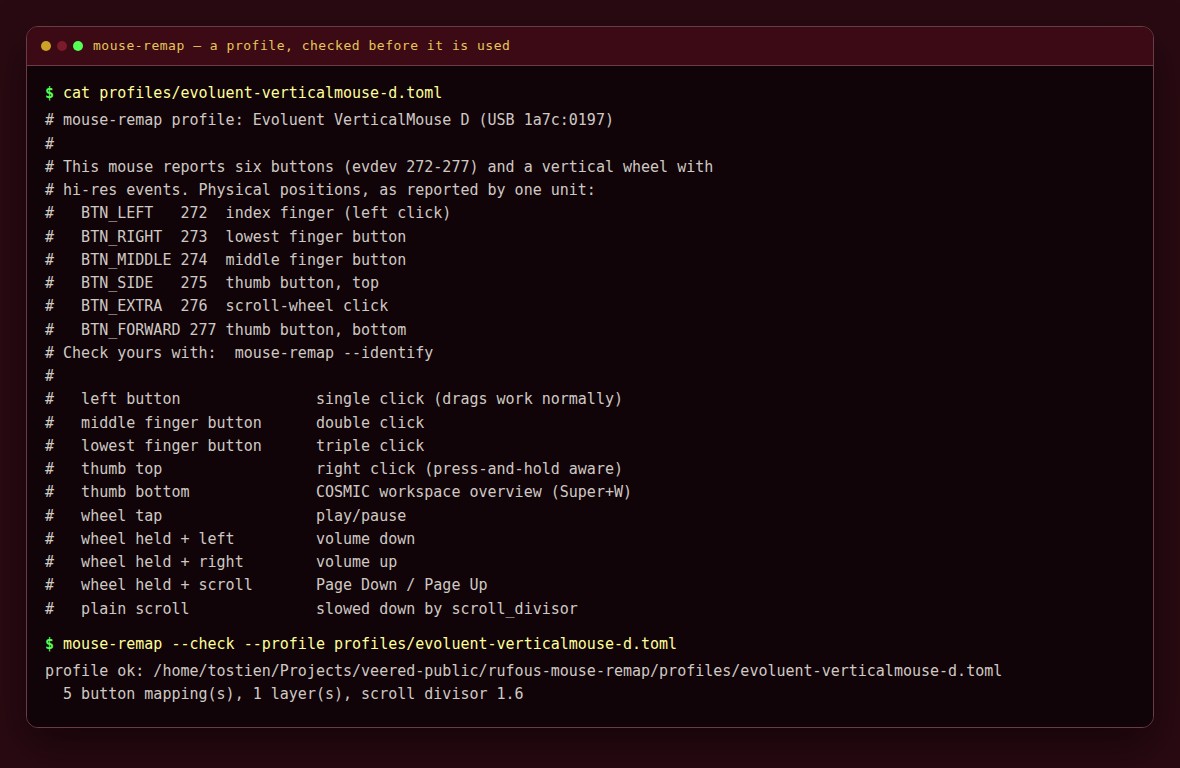
*A profile is a small text file: one line per button. --check tells you it is sound before you use it.*
Please test before relying on it
This is shared as-is, with no warranty. It works on my own computers, but your system, settings and software versions may differ, so please try it in a safe setting first. If something doesn't work, you can ask Claude (or another AI coding assistant) to look into it, and I'd appreciate hearing what you found and how you fixed it. You are also welcome to just let me know at support@veered.org, and I'll look into it.
Information for nerds: requirements, install, profiles and permissions
- Python 3.11 or newer (for
tomllib) and python-evdev:sudo apt install python3-evdev - Read access to the mouse's
/dev/input/event*node and write access to/dev/uinput(see Permissions). - Do not run another remapper (input-remapper, keyd, etc.) on the same mouse; only one program can grab it.
Install
./install.sh --profile evoluent-verticalmouse-d   # or: --profile generic-example
sudo ./install-udev-rule.sh --profile ~/.config/cosmic-tools/mouse-remap.toml
systemctl --user daemon-reload && systemctl --user enable --now mouse-remap
journalctl --user -u mouse-remap -f               # watch it work
install.sh puts the program in ~/.local/share/cosmic-tools/mouse-remap (linked from ~/.local/bin/mouse-remap), copies the profile to ~/.config/cosmic-tools/mouse-remap.toml unless one exists, and installs a systemd user unit. Pass --enable to start the service straight away.
After editing the profile: mouse-remap --check, then systemctl --user restart mouse-remap.
Making a profile for your mouse
mouse-remap --list-devices                     # find the name or vendor:product
cp profiles/generic-example.toml ~/.config/cosmic-tools/mouse-remap.toml
$EDITOR ~/.config/cosmic-tools/mouse-remap.toml   # set [device]
mouse-remap --identify                         # press buttons to see their codes
mouse-remap --check                            # validate
--identify reads without grabbing, so the buttons still do their normal thing while you test.
Profile format
[device]                 # all given fields must match
name = "VerticalMouse"   # case-insensitive substring of the device name
vendor = 0x1a7c          # USB ids, as shown by lsusb or --list-devices
product = 0x0197
# path = "/dev/input/by-id/usb-...-event-mouse"   # or one exact node

[options]
scroll_divisor = 1.6     # 1 = unchanged, 2 = half speed; remainders carry over
click_gap_ms = 50        # between synthetic clicks
click_hold_ms = 15       # how long each synthetic click is held
key_gap_ms = 30          # between the keys of a combo

[buttons]                # buttons not listed pass through untouched
BTN_MIDDLE = { click = 2 }
BTN_SIDE = { button = "BTN_RIGHT" }
BTN_FORWARD = { combo = ["KEY_LEFTMETA", "KEY_W"] }

[layers.BTN_EXTRA]       # hold BTN_EXTRA to shift; tap it for `tap`
tap = { key = "KEY_PLAY" }
scroll_up = { key = "KEY_PAGEUP" }
scroll_down = { key = "KEY_PAGEDOWN" }

[layers.BTN_EXTRA.buttons]
BTN_LEFT = { exec = ["wpctl", "set-volume", "@DEFAULT_AUDIO_SINK@", "5%-"] }
Buttons are evdev names (BTN_LEFT, BTN_RIGHT, BTN_MIDDLE, BTN_SIDE, BTN_EXTRA, BTN_FORWARD, BTN_BACK, BTN_TASK) or numeric codes as strings ("280"). Key names come from [linux/input-event-codes.h](https://github.com/torvalds/linux/blob/master/include/uapi/linux/input-event-codes.h) (KEY_VOLUMEUP, KEY_LEFTCTRL, ...).
| Action | Effect |
|---|---|
"pass" | Leave the button alone |
"disable" | Swallow the button |
{ click = N } | N left clicks (1 to 5) |
{ button = "BTN_..." } | Act as another mouse button, including press-and-hold |
{ key = "KEY_..." } | Tap a key |
{ hold_key = "KEY_..." } | Hold a key for as long as the button is held |
{ combo = ["KEY_A", "KEY_B"] } | Press keys in order, release in reverse |
{ exec = ["prog", "arg"] } | Run a program (argument list, no shell) |
Layers: while a layer button is held, buttons listed under the layer and the wheel use the layer's actions; other buttons keep their normal mapping. Releasing the layer button without having used the layer fires tap. Holding the layer button while scrolling swallows both the coarse and the hi-res wheel streams, so the page does not also scroll.
Tips:
- Desktops can intercept media keys through their own shortcut settings. If a
KEY_VOLUMEUPmapping appears to do nothing, check the desktop's keyboard shortcuts, or useexecwithwpctlorplayerctlinstead. - Commands from
execrun as your user with the service's environment. A systemd user service has your session bus, sowpctl,playerctlandnotify-sendwork.
Permissions
mouse-remap needs to read one input device and write /dev/uinput. Pick one:
- udev rule (recommended).
sudo ./install-udev-rule.sh --profile FILE(or--vendor 1a7c --product 0197, or--name "Device Name") writes/etc/udev/rules.d/70-mouse-remap.rules, which tags/dev/uinputand just that mouse withuaccess, so the user at the active local seat gets access. It also loads theuinputmodule at boot. Use--dry-runto see the rules first and--removeto undo. Unplug and replug the mouse afterwards. - **
inputgroup.**sudo usermod -aG input $USER, plus a rule giving the group/dev/uinput(KERNEL=="uinput", GROUP="input", MODE="0660"), then log out and in. Simpler, but it lets every program you run read every input device, keyboards included.
Either way, write access to /dev/uinput lets programs you run inject input events. That is inherent to any uinput remapper; running it as root instead does not reduce the risk.
Uninstall
systemctl --user disable --now mouse-remap
./uninstall.sh              # keeps your profile; --purge deletes it
sudo ./install-udev-rule.sh --remove
Tests
python3 -m unittest discover -s tests -vThe tests exercise every gesture of the Evoluent profile, the profile loader and its error messages, and the installer in a throwaway HOME. They open no input devices and create no uinput devices.
Information for nerds: the files
| File | Purpose |
|---|---|
mouse-remap | The daemon and CLI (grab, re-emit, --check, --identify, --list-devices) |
remap_logic.py | Pure decision logic: events in, actions out. Change behaviour here. |
remap_profile.py | TOML profile loader and validator |
profiles/ | Evoluent VerticalMouse D profile and a generic template |
systemd/mouse-remap.service | systemd user unit |
install-udev-rule.sh | Optional root step for device permissions |