Information Disclosure Statement Generator (Sienna)
Hand it the patent numbers you need to disclose and it writes the Information Disclosure Statement for you: it looks each reference up, finds the dates and the first named inventor, sorts them into the four tables the Patent Office expects, numbers them straight through, and saves a Word document you can check, sign and file.
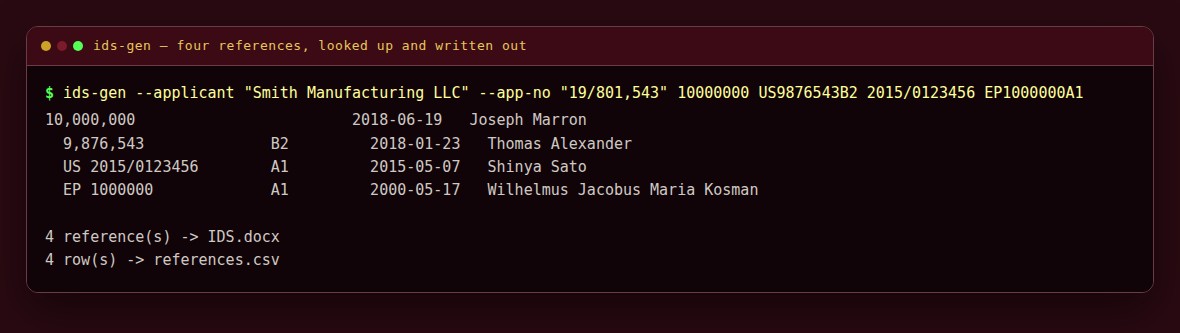
It prints what it found for each reference as it goes, and tells you which ones it could not find.
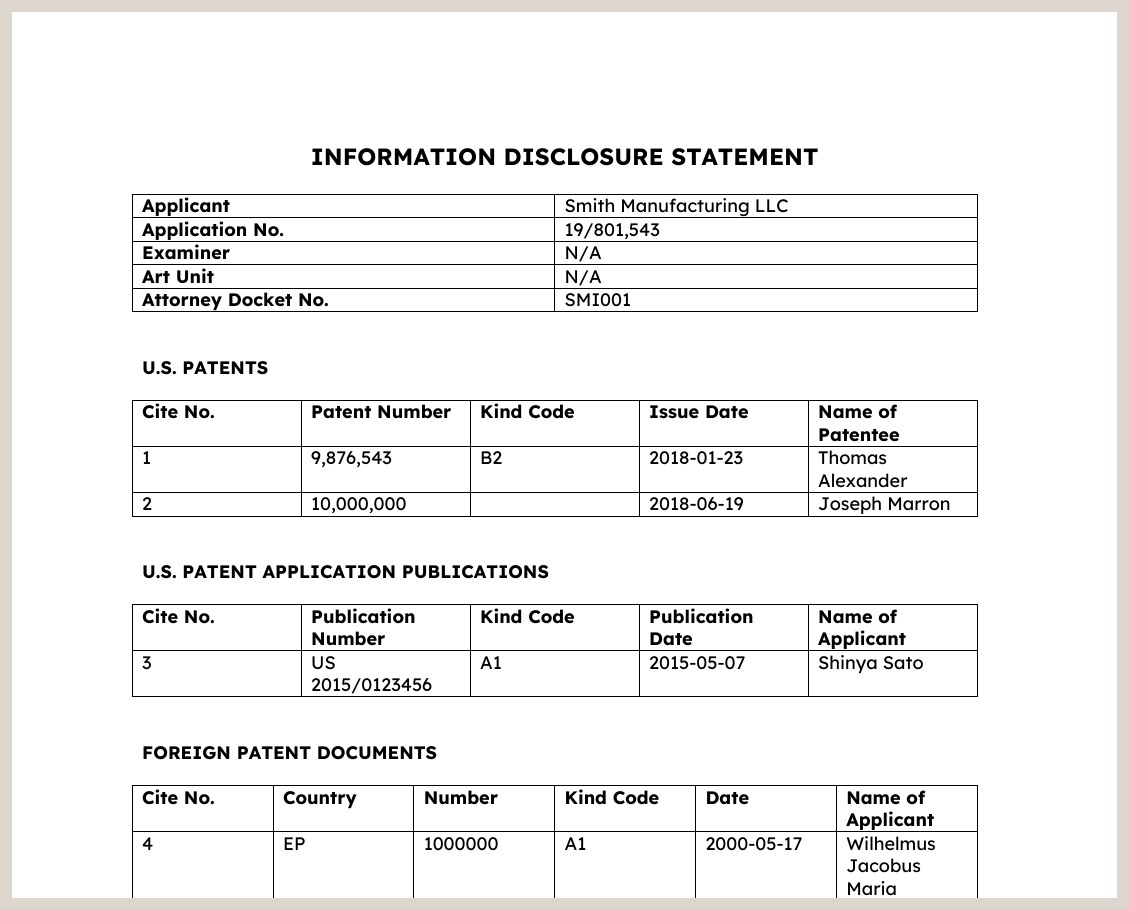
The Word document it saves. Open it, check it, sign it, file it. It ends with a signature block (signature, name, registration number) dated the day it was made.
Not legal advice, and not a substitute for reading the references. This is a typing tool. Check every line against the document itself before you file anything, and check the rules in force when you file (37 CFR 1.97 and 1.98). Nothing is sent to the Patent Office by this program.
What it does
- You give it numbers, in whatever shape they come in:
10000000,US 9,876,543 B2,2015/0123456,EP1234567A1, or the name of a journal article. - It sorts them out. US patents, US published applications, foreign documents and other literature each go to their own table, in number order, numbered 1, 2, 3... in one run across all four.
- It adds the T column to the foreign table: a clickable box meaning an English-language translation is provided, as on the SB-1449 and the PTO-892 from November 5, 2026. The box starts checked for foreign documents, and clear for offices that publish in English and for EP and WO, where the language varies. Clear any box with no translation behind it.
- It fills in the dates and the inventor from the published record for each patent, and says so plainly when it cannot find one, so nothing is quietly left blank.
- It writes a Word document — headings, the applicant block, the tables and the certification paragraph — that you finish in Word and file as usual.
- It can read a folder of prior-art PDFs and take the numbers from the file names, which is how they usually arrive.
- It never files anything and never touches the Patent Office.
How you use it
One line, with the numbers:
python3 ids_gen.py --out IDS.docx --applicant "Smith Manufacturing LLC" \
    --app-no "19/801,543" --docket "SMI001" \
    10000000 US9876543B2 2015/0123456 EP1234567A1
Or from the folder the prior art already lives in:
python3 ids_gen.py --from-folder "Prior Art" --out IDS.docx --csv references.csvIt prints a line per reference as it goes, writes the document, and ends by naming anything it could not look up so you can fill those in yourself.
Information for nerds: options, lookups and tests
| Option | What it does | ||
|---|---|---|---|
numbers... | References on the command line, in any of the shapes above | ||
--from-file FILE | One reference per line; # starts a comment | ||
--from-folder DIR | Take the numbers from the names of the PDFs in a folder | ||
-o, --out FILE | The Word file to write (default IDS.docx) | ||
--csv FILE | Also write what was found as a spreadsheet | ||
--applicant, --app-no, --filed, --title, --docket | Fill in the header block | ||
--examiner, --art-unit | Default to N/A, which is right for an application that has not been examined | ||
--attorney | Name in the signature block | ||
--reg-no | USPTO registration number in the signature block (left as a line to fill in when not given) | ||
--no-lookup | Stay offline and list the numbers exactly as given | ||
| `--source auto\ | google\ | odp` | Where to look numbers up. odp is the USPTO's own Open Data Portal (needs a free key: --odp-key or $USPTO_ODP_KEY). auto uses it when a key is set, Google Patents otherwise |
--old-db FILE | An offline index of pre-2001 US patents from build_old_db.py, consulted when the portal or Google has nothing (default $SIENNA_OLD_DB) | ||
--no-google | With --source odp, do not try Google Patents for what the portal lacks |
Where the data comes from. By default, Google Patents. Google refuses requests from many servers and shared hosts (a "Sorry..." 503 page); if you see lookup failed (HTTPError) on every line, get a free API key from the USPTO Open Data Portal (https://data.uspto.gov/apis/getting-started) and run with --source odp. That reads the Patent Office's primary record (filing date, grant or publication date, first named inventor) and backs off politely when the portal throttles a burst; it covers US patents and publications only, so foreign documents are left for you to complete.
Patents from before 2001. The portal only knows applications filed on or after 1 January 2001, so a 1990s patent comes back "nothing found" there and, on a server Google refuses, would stay blank. build_old_db.py fixes that: it turns PatentsView's bulk grant data (1976 on, rehosted by the USPTO as product PVGPATDIS) into a SQLite index of every grant the portal lacks, about 2.5 million rows in a couple of hundred megabytes, and --old-db (or $SIENNA_OLD_DB) makes the generator consult it whenever the portal or Google has nothing:
python3 build_old_db.py --odp-key $USPTO_ODP_KEY --out old_patents.sqlite ids-gen --source odp --old-db old_patents.sqlite 5368281 5518486
The download is three zips of about a gigabyte in all; the portal allows twenty downloads of each per year, so keep them. The order of lookups is: the portal, then the index, then Google Patents (skip that last step with --no-google on a host Google blocks). With --source google it is Google, then the index.
With Google Patents: each patent's own published record on Google Patents, read from the page's metadata: filing date (DC.date scheme=dateSubmitted), issue or publication date, and the first named inventor. A granted patent carries its issue date with scheme="issue"; a publication has a plain DC.date instead, and the program knows the difference. There is a short pause between lookups, to be a polite visitor. Anything it cannot find is listed at the end rather than left silently empty.
Duplicates are dropped: the same number given twice, or a number that also turns up in the folder, is listed once.
Requirements: Python 3.9 or newer and python-docx (pip install python-docx, or sudo apt install python3-docx).
Tests:
python3 -m unittest discover -s tests -vThey cover the classifying, the number shapes, the folder reading and the document itself, and never go online.
License
MIT. See LICENSE. Written with AI assistance (Claude).