Gmail Spam Check (Garnet): a daily report of real mail stuck in spam
Gmail's spam filter sometimes catches a client, a customer or a government notice. Garnet looks through your spam folder once a day and emails you a short report of the messages that probably don't belong there, each with a short preview and two buttons: Not spam moves it to your inbox, Really spam keeps that sender out of future reports.
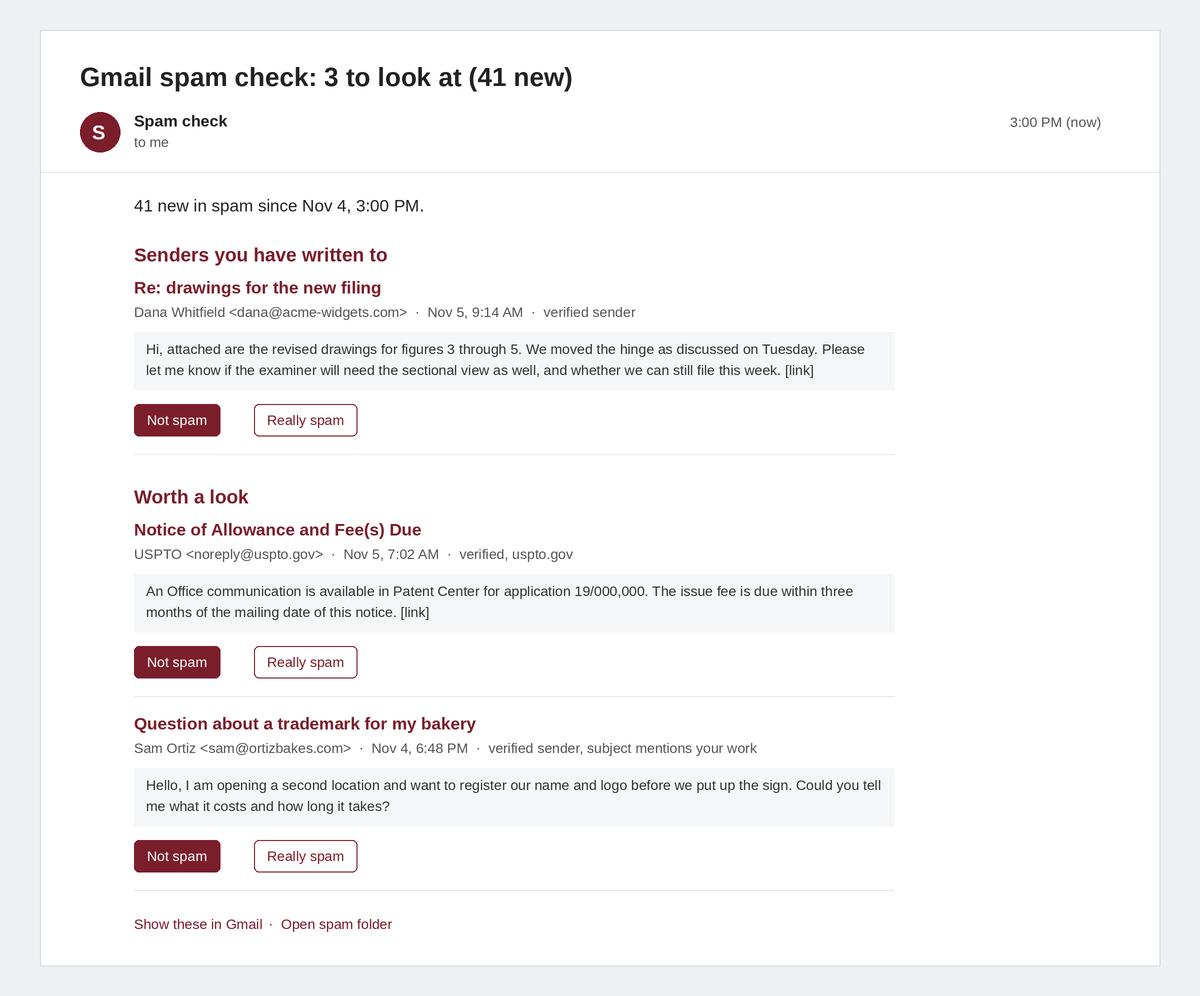
What it flags
- Senders you have written to: anyone at an address you've sent mail to, or at a company domain you've written to (when the message passes SPF or DKIM, so it isn't forged).
- Verified government and payment mail: any
.govor.courtdomain, plus the senders intrusted(PayPal, DocuSign and so on). - Possible new business: verified senders whose subject has one of your
inquirywords (quote, invoice, appointment…).
It skips newsletters (anything with an unsubscribe header), sales pitches matching the pitch words, your own domains (forged mail "from" you can pass SPF) and the addresses in ignore. Your button clicks are remembered by sender: the latest click wins, and two "Really spam" clicks at the same company domain hide the whole domain.
Spam is written by strangers, so the report shows only plain text, with every link removed.
Set it up (about 5 minutes)
- Go to script.google.com, signed in to the Gmail account you want checked, and click New project. Name it "Spam check".
- Delete the sample code, paste in all of [
Code.gs](Code.gs), and click Save. - Edit
SETTINGSat the top: your own domains, the hour you want the report, and yourinquirywords (see the example below). - In Project Settings (the gear), set the time zone, and tick Show "appsscript.json". Replace that file's contents with [
appsscript.json](appsscript.json). - Pick setup in the function menu and click Run. Google asks you to allow access to your Gmail: click your account, then Advanced → Go to Spam check (unsafe) → Allow. ("Unsafe" only means the script isn't one Google has reviewed: it's yours, running in your own account.) Your first report, covering the last 7 days, arrives a minute later.
- For the buttons: Deploy → New deployment, type Web app, Execute as Me, Who has access Only myself, then Deploy. Reports made after this show the buttons.
To try settings without sending anything, pick dryRun and click Run: the report appears in the execution log.
Example settings for a law office
ownDomains: ['yourfirm.com'],
trusted: ['uspto.gov', 'wipo.int', 'epo.org', 'paypal.com', 'docusign.net'],
inquiry: /\b(patents?|trademarks?|copyrights?|invention|inventor|office action|infring\w*|cease and desist|attorney|lawyer|consultation|retainer|invoice)\b/i,
pitch: /\b(services?|support|expert|outsourc\w*|analytics|resume|job|newsletter|webinar|expand your reach)\b/i,
Notes
- Gmail deletes spam after 30 days, and the buttons stop working after 30 days too.
- If you are signed in to several Google accounts, a button may say it can't open the page. Open it in a window signed in only to this account, or sign in to this account first.
- To stop it: Triggers (the clock icon) → delete the
dailyChecktrigger. - Google limits a free Gmail account to about 20,000 reads a day, far more than this needs.
<details><summary>For the curious</summary>
Code.gsis the whole program. It keeps two values in your script's private storage: the time of the last run, and your button verdicts.- If a run fails, it emails you "Gmail spam check FAILED" and the next run covers the missed mail.
tests/run.jschecks the logic against fake mail:node tests/run.js(Node only, no packages).
</details>
License
MIT License.