Website Appointment Scheduler (Crimson)
Put a "book a time with me" page on your own website. A visitor picks a day and a time, gets a confirmation and a calendar invitation, and is reminded before the appointment. You keep the diary, the times you are not available, and the list of who booked — on your own site, with no monthly fee to anybody.
Not affiliated with Easy!Appointments. This project is an independent set of patches and add-on files. Easy!Appointments is Copyright (c) Alex Tselegidis and released under the GNU GPL v3. Please report problems with these patches here, not upstream.
This repository does not contain Easy!Appointments itself. You download the official release and apply the patches in patches/ to it; the feature code lives in custom/, which Easy!Appointments updates never touch.
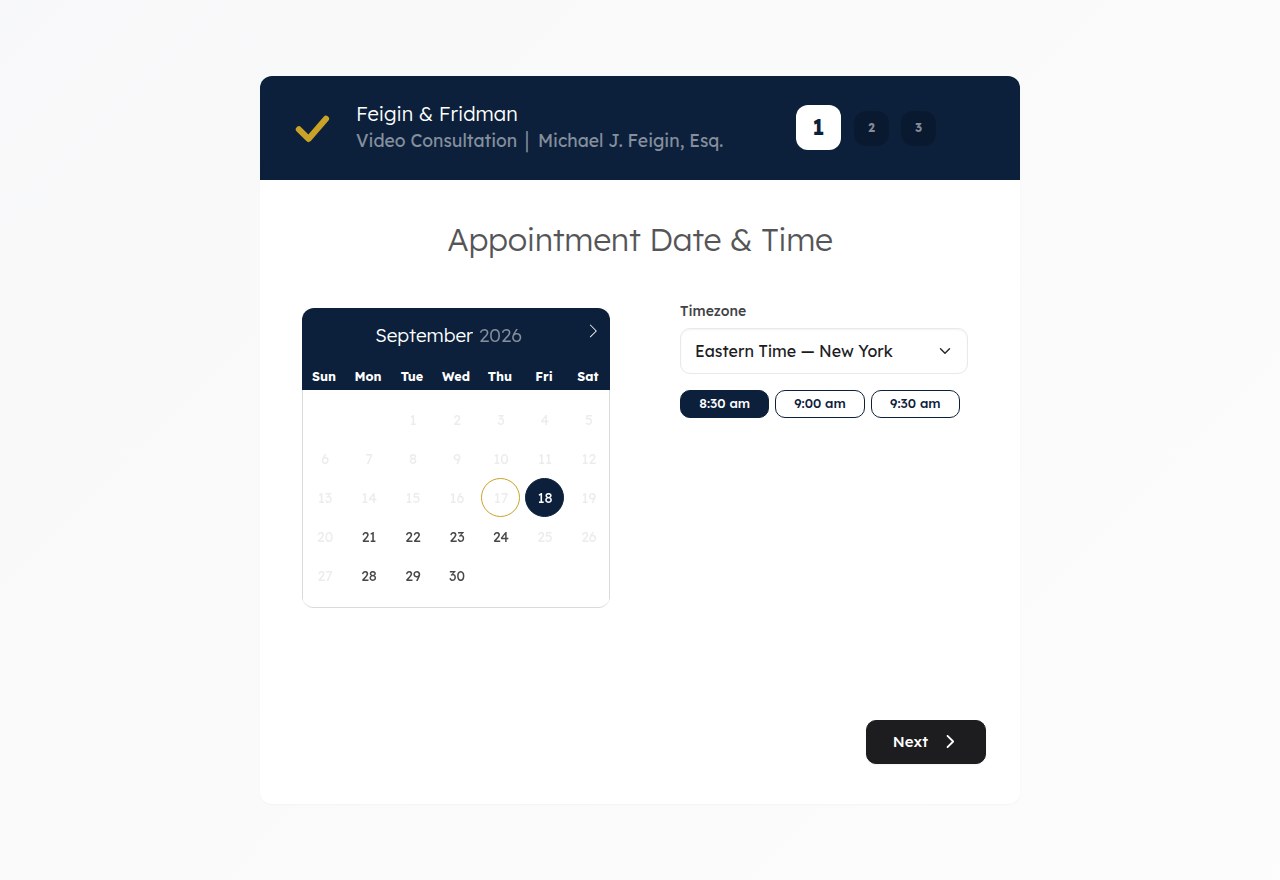
A live installation: the visitor picks a slot, and the confirmation and calendar invitations go out by themselves.
Please test before relying on it
This is shared as-is, with no warranty. It works on my own computers, but your system, settings and software versions may differ, so please try it in a safe setting first. If something doesn't work, you can ask Claude (or another AI coding assistant) to look into it, and I'd appreciate hearing what you found and how you fixed it. You are also welcome to just let me know at support@veered.org, and I'll look into it.
Information for nerds: what is in it, how to install it, every setting
| Feature | Where | Default |
|---|---|---|
| Theme via CSS variables (colours, font), compact time-slot grid | 0001, custom/theme.css | on (neutral colours) |
Embed mode: cb-embed class inside an iframe / ?embed=1, no height feedback loop | 0001, embed/embed-snippet.html | on |
| Visitor timezone auto-detect, including zones missing from the dropdown | 0001, custom/js/cb-timezone.js | on |
| Slots snap to :00 / :30 when a free period starts off-grid | 0002 | on (30 min) |
| Fix: rescheduling always failed with "not available" | 0003 | fix |
Fix: Google OAuth "Access blocked: this app's request is invalid" (max_auth_age) | 0004 | fix |
Google Calendar event title/description template (e.g. Video: Name; phone + topic) | 0005 | EA default |
Client .ics invite: short summary and description instead of both parties' contact details | 0006 | EA default |
| Envelope sender (SPF/DMARC alignment) and custom email logo | 0007 | off |
| Confirmation email: company-colour accent, "next steps" links box, hideable rows, small print | 0008 | EA default |
| Post-booking redirect to your own page (breaks out of the iframe) | 0009 | off |
| Spam scoring, country rules, silent quarantine, booking-origin logging | 0010, custom/cb_booking_meta.php | off |
| Staff "unlock all times" override (same-day bookings on the phone) | 0011, custom/cb_open.php | off |
| 24 h / 1 h reminder emails (Easy!Appointments has none) | custom/reminder_cron.php | off |
| Weekly digest of quarantined bookings | custom/quarantine_digest.php | off |
| Shabbat and Yom Tov blackouts from Hebcal, Friday pre-Shabbat cutoff | custom/refresh_blocks.php | off, no default location |
| JSON appointment-time endpoint for a countdown on your own page | custom/appt-time.php | off |
| Remove "Powered by" from client-facing pages and emails | 0012 (optional) | – |
| ISO dates (2026-01-31) for the YMD format | 0013 (optional) | – |
| Cancellation hint names the right button | 0014 (optional) | – |
What you need
- Easy!Appointments 1.6.0 (the patches are made against the official release zip)
- PHP 8.1+ with
mysqli(as required by Easy!Appointments), MySQL or MariaDB patch(GNU patch or BSD patch)- Cron, for reminders, blackouts and the digest
- Optional: MaxMind GeoLite2 Country database and
mmdblookupfor country features - Optional: outbound HTTPS to
www.hebcal.comfor the blackout refresh
Install
- Install Easy!Appointments 1.6.0 from the official release and finish its web installer.
- Apply the patches from the Easy!Appointments root (back up first):
sh cd /path/to/easyappointments for p in $(grep -v '^#' /path/to/consultation-booking/patches/series); do patch -p1 --dry-run < /path/to/consultation-booking/patches/$p && \ patch -p1 < /path/to/consultation-booking/patches/$p done
0001–0011 are required by the add-ons. With the default configuration they change only the bug fixes, slot snapping, the neutral theme, embed mode and timezone detection; every other feature stays off until you configure it. 0012–0014 are optional and independent; remove their lines from the loop to skip them.
- Copy the add-ons into the Easy!Appointments root:
sh cp -R /path/to/consultation-booking/custom /path/to/easyappointments/custom cp custom/cb_config.sample.php custom/cb_config.php # then edit
custom/.htaccess (Apache 2.4) blocks web access to everything except static assets and appt-time.php. On nginx or other servers, add an equivalent deny rule for custom/ (at minimum *.php except appt-time.php, *.sql, *.md).
- Create the extra tables (only needed for reminders, logging, quarantine):
sh mysql -u USER -p DATABASE < custom/sql/install.sql
- Cron (adjust paths; use the PHP binary of your site):
cron */15 * * * * php /path/to/easyappointments/custom/reminder_cron.php 0 3 1 * * php /path/to/easyappointments/custom/refresh_blocks.php 0 8 * * 1 php /path/to/easyappointments/custom/quarantine_digest.php
With an hourly-only scheduler, set reminders.window_seconds to 2100 or more. Some shared hosts regenerate the user crontab from their control panel; if reminders stop, check that the lines are still there.
- Embed (optional): paste
embed/embed-snippet.htmlinto a page on the same origin.
Configuration
All options live in custom/cb_config.php, deep-merged over custom/cb_defaults.php, which documents every key. The main groups:
theme,embed,availability.snap_minutes,timezone_detectpost_booking_redirect–url,hash_param,break_out_of_iframemail–envelope_sender,logo_path,logo_max_width_px,logo_linkconfirmation_email–steps,steps_title,hide_rows,footer_htmlics–summary,description_lines(placeholders{service},{provider_name},{customer_name},{company_name},{hash},{meeting_link})google_calendar_event–summary,description_fieldreminders–enabled,offsets,window_seconds,subjects,leads,body_extra_htmlopen_override–enabled,allow_backend_session,secret,cookie_path,ui_triggersorigin_logging,geoip,spam,country_rules,digest– see the privacy notes belowjewish_calendar–location(latitude,longitude,tzid,israel),schedule_timezone,candle_minutes,holidays,friday
Shabbat and Jewish-holiday blackouts
refresh_blocks.php asks Hebcal for candle-lighting and havdalah times at your location and writes Easy!Appointments blocked periods (in schedule_timezone, the provider's zone):
- Yom Tov (
holidays): from candle lighting minusblock_before_minutesuntil havdalah (plusblock_after_minutes). A two-day Yom Tov, or Yom Tov next to Shabbat, is one block. - Friday cutoff (
friday): from candle lighting minuscutoff_before_minutesuntil havdalah, so Friday appointments must end before the cutoff. israel: trueuses the Israeli one-day Yom Tov schedule. Location and schedule zones can differ: a practice can keep its calendar in one timezone while following Shabbat times at another location; a partial day in the calendar's zone then stays bookable.
There is no default location: the script refuses to run until the location is set. Try php custom/refresh_blocks.php --dry-run first. Only future rows whose notes start with auto:cb- are replaced, so blocked periods you create by hand are kept. Combine with slot snapping so the first slot after a block lands on :00 or :30. Ask your rabbi about the offsets; the times come from Hebcal (CC BY 4.0) and are your responsibility to check.
Unlock all times
For staff taking a booking by phone: with the override on, the wizard offers every free slot of the day, including today, ignoring the working plan, breaks, blocked periods, minimum notice and the future-booking limit. Existing appointments and unavailabilities are still respected and past times are hidden. Spam screening still applies.
Switch it with triple-click on the header banner or Ctrl+Alt+U on the booking page (a short message confirms the new state and repeats on each load while it is on), or with ?cb_open=1 / ?cb_open=0. It is honoured only for a browser logged in to the Easy!Appointments backend, or with &key=<secret> when open_override.secret (16+ characters) is set. The cookie holds an HMAC, so it cannot be set by hand.
Privacy and legal notes
The spam and origin features process personal data and can silently turn people away. They are off by default. Before enabling them:
- Disclose it. If you log IP addresses, user agents, referrers or derived country (
origin_logging,geoip), say so in your privacy policy, with the purpose and retention period. Under the GDPR and similar laws these are personal data; you need a lawful basis (typically legitimate interest in fraud and spam prevention) and a retention limit. Purge old rows fromea_cb_booking_logandea_cb_quarantineon a schedule. - Silent quarantine has costs. With
spam.mode = quarantineor a non-emptycountry_rules.blocked, a matching visitor sees a normal confirmation, but no appointment, email or calendar event is created. A false positive is a genuine client who believes they are booked and never hears from you. Blocking by country also treats everyone in that country alike, which may raise fairness or discrimination concerns in your jurisdiction and profession. Start withspam.mode = flag(score shown in internal emails only), keep the weekly digest on, usecountry_rules.trustedandallow_ipsgenerously, and contact anyone in the digest who looks genuine. - Tune the keywords.
spam.legit_keywordsships with neutral examples. Replace them with words your real clients use (for example the services you offer, in the languages you serve). The topic field isspam.topic_field(defaultcustom_field_1, which you enable in Easy!Appointments' booking settings). - The internal origin block is added only to provider, admin and secretary emails and all values are HTML-escaped. The client never sees it.
- Behind a reverse proxy or CDN set
origin_logging.ip_server_keyto the header that proxy sets; otherwise leaveREMOTE_ADDR, because forwarded headers are client-supplied.
Branding and the GPL
Patch 0012 removes "Powered by Easy!Appointments" from the booking page, message pages and emails. That credit line is not a license notice, and removing it is permitted by the GPL. What you must keep: the copyright and license headers in the source files, the LICENSE file, and the GPL's terms when you distribute the software (including your modifications). The backend keeps its Easy!Appointments credit. Consider linking to the source somewhere, even though the GPL does not require it for software you only run on your own server.
Security notes
- Keep
custom/cb_config.phpand Easy!Appointments'config.phpunreadable from the web. Test withcurl -I https://example.com/book/custom/cb_config.php(expect 403). - Appointment hashes act as bearer tokens (they allow rescheduling).
appt-time.phpreturns only times and a cancelled flag, and is disabled by default. - The post-booking redirect accepts only
http(s)URLs from your config. - Every add-on hook fails open: an error in scoring, logging or geolocation never blocks a booking.
- Easy!Appointments serves minified JavaScript with a static cache token. Patch 0003 bumps it; if you apply 0012 or 0013 later, change
cache_busting_tokeninapplication/config/app.phpagain so browsers fetch the new files.
Upgrading Easy!Appointments
The patches target 1.6.0 exactly. To upgrade: install the new release in a fresh directory, copy config.php, storage/ and custom/, then try the patches with --dry-run. Where a hunk no longer applies, re-apply that change by hand (each patch header explains what and why) and keep your copy of the file for the next upgrade. custom/ is never overwritten.
Tests
tests/run.sh                                  # php -l + unit tests (no database, no network)
tests/run.sh /path/to/pristine/easyappointments-1.6.0   # also verify every patch applies
The unit tests cover the spam scorer and screening decisions, IP ranges, output escaping, slot snapping, the override's slot generation and authorisation, the Shabbat/Yom Tov computation against a recorded-format Hebcal fixture, reminder timing and templates.
License
GNU General Public License v3.0 (see LICENSE), the same license as Easy!Appointments, from which the patches are derived. Easy!Appointments is Copyright (c) Alex Tselegidis. Hebcal data is provided by Hebcal.com under CC BY 4.0.