COSMIC Panel Tools: Word of the Day, Weather, Clocks and Music (Redshift)
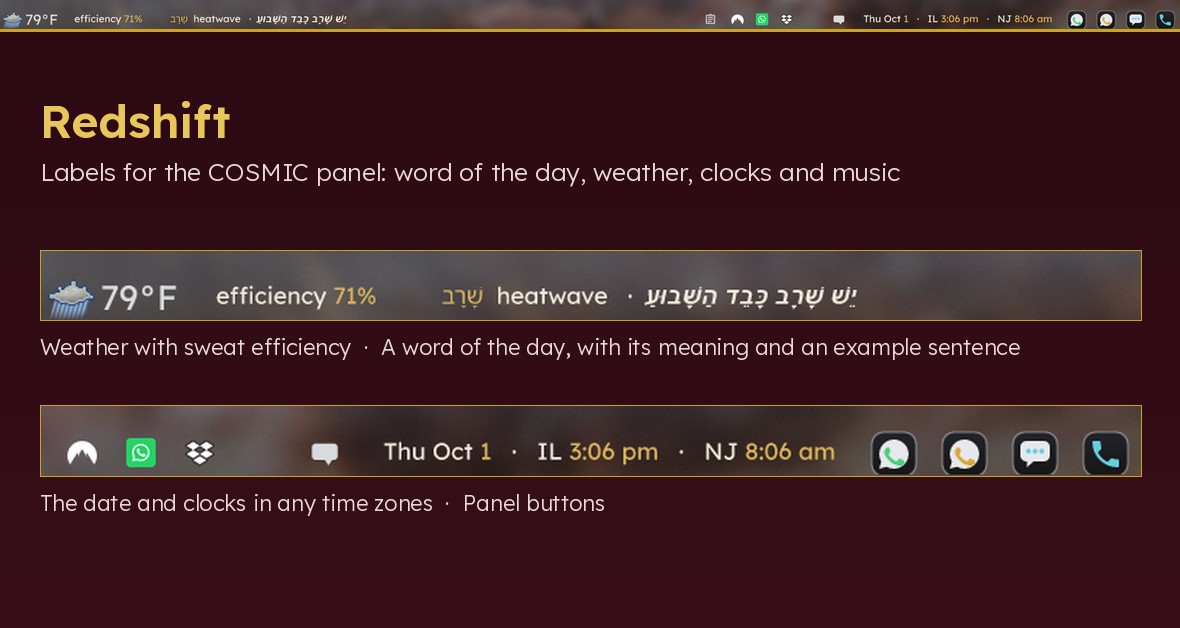
Informational labels for the COSMIC panel, drawn by the cbar applet:
| Instance | Shows |
|---|---|
word | A word of the day (or hour) in the language you pick, with gloss, transliteration and an example sentence. Right-to-left scripts and vowel points are handled. |
weather | Temperature and sweat efficiency: how much of sweat's cooling power the air still allows, computed from the dew point. |
clocks | The date and the time in any number of time zones. |
music | A scrolling now-playing marquee for the [music](https://veered.org/cardinal/) (Cardinal) player. |
Also included: a launcher that runs several cbar instances side by side, a helper that creates an extra COSMIC panel for them, a helper that keeps that panel on the monitor you want, and a size tuner.
Please test before relying on it
This is shared as-is, with no warranty. It works on my own computers, but your system, settings and software versions may differ, so please try it in a safe setting first. If something doesn't work, you can ask Claude (or another AI coding assistant) to look into it, and I'd appreciate hearing what you found and how you fixed it. You are also welcome to just let me know at support@veered.org, and I'll look into it.
Information for nerds: requirements, install and every setting
- COSMIC desktop (Pop!_OS 24.04 or another distribution shipping COSMIC)
- cbar, installed separately from github.com/alexandreprates/cbar (GPL-3.0; it is not bundled here). Its README has a one-line installer.
- Packages (Debian / Ubuntu / Pop!_OS names):
sh sudo apt install python3 python3-pil fontconfig fonts-noto-core # Japanese / Chinese / Korean word lists: sudo apt install fonts-noto-cjk # the music marquee needs the music player from Cardinal (https://veered.org/cardinal/)
Without python3-pil the labels still work, as plain uncoloured text.
Install
./install.sh                                   # all four instances
./install.sh --instances "word clocks"         # only some
./install.sh --output-service                  # also keep the extra panel on its monitor
The installer only writes inside your home directory, never edits a COSMIC panel, and never restarts anything. Then:
- Edit
~/.config/cosmic-tools/panel-bar.conf(see below). Changes apply at each plugin's next refresh. - Add the applets cbar (word), cbar (weather), cbar (clocks), cbar (music) to a panel in COSMIC Settings > Desktop > Panel. If they are not listed yet, log out and back in. Or create a dedicated panel, below.
Uninstall with ./uninstall.sh (add --purge to delete settings and caches).
Configuration reference
~/.config/cosmic-tools/panel-bar.conf is shell-style KEY=VALUE. Quote values containing spaces, #, or parentheses. A commented template is in [panel-bar.conf.example](panel-bar.conf.example).
Appearance
| Key | Default | Meaning |
|---|---|---|
LABEL_STYLE | svg | svg draws colours and exact sizes; text prints plain labels |
FONT_SIZE | 26 | Label font size, px |
FONT_SIZE_WORD, _WEATHER, _CLOCKS, _MUSIC | FONT_SIZE | Per-instance override |
BOX | 1.0 | Label image height as a multiple of the font size |
BOX_PLAYING | 1.35 | BOX while the music player runs |
LATIN_FONT | Sans | Font family for Latin text (any fc-match pattern) |
NATIVE_FONT | by language | Font family for non-Latin text; defaults to the matching Noto family |
ACCENT_COLOR | #d9b45b | Highlight colour |
FG_DARK / FG_LIGHT | #f2ecdd / #1b2433 | Text colour for dark / light COSMIC themes |
Why BOX works backwards: the panel scales every label image to a fixed height, so what decides how large the text looks is how much of the image the glyphs fill. A taller box means smaller text. panel-bar-size edits these values.
Word of the day
| Key | Default | Meaning |
|---|---|---|
WORD_LANG | es | Language code. Bundled lists: ar de es fr he it ja ru yi |
WORD_SOURCE | bundled list | Path or http(s) URL of a JSON word list |
WORD_SOURCE_TTL | 6h | How long a downloaded list is reused (the last good copy is kept if a download fails) |
WORD_ROTATE | 1h | How often the word changes (30m, 1h, 1d; daily turns over at local midnight) |
WORD_LABEL_EXAMPLE | 0 | 1 also puts the example sentence on the bar |
WORD_SHUFFLE_SEED | veered | Change for a different order |
ADD_VOWELS | 0 | Hebrew only: add vowel points (nikud) to unpointed lists, see below |
Right-to-left languages (he, yi, ar, fa, ur) are laid out right to left inside the label, and popup lines get the bidi marks they need.
Word list format — a JSON array:
[
  {
    "word": "libro",
    "translit": "",
    "gloss": "book",
    "example": "Este libro es muy interesante.",
    "example_translit": "",
    "example_translation": "This book is very interesting."
  }
]
Only word is required. {"words": [...]} and arrays of [word, translit, gloss, example, example_translation] are accepted too. The bundled lists hold 40 everyday words each and are released under CC0 1.0; the Hebrew list is already fully pointed. Corrections and new languages are welcome.
Vowel points via Dicta. With WORD_LANG=he and ADD_VOWELS=1, unpointed Hebrew is sent to the Nakdan service run by Dicta and the result is cached in ~/.cache/cosmic-tools/nikud.json, so each word or sentence is requested once. Dicta returns defective spelling (ktiv haser); lib/ktivmale.py moves the vowels back onto the original full spelling and keeps the unpointed text whenever the two do not align. This feature is off by default: it sends your word list to a third-party service. Read and respect Dicta's terms of use before enabling it, and do not use it for bulk processing. tools/vocalise-wordlist.py does the same once for a whole list, so a pointed list can be published and no runtime requests are needed.
Weather and sweat efficiency
| Key | Default | Meaning |
|---|---|---|
WEATHER_LAT, WEATHER_LON | (none) | Decimal coordinates. Required; the label asks for them until set |
WEATHER_LABEL | coordinates | Place name for the popup |
WEATHER_UNITS | C | C or F |
WEATHER_SKIN_C | 35 | Sweating-skin temperature, °C |
WEATHER_REFRESH | 15m | How often open-meteo is queried (the label redraws every minute from cache) |
WEATHER_SHOW_TEMP | 1 | 0 shows only the efficiency, e.g. next to COSMIC's own weather applet |
WEATHER_MAX_STALE | 3h | Older cached readings are not shown |
The efficiency is (e(skin) − e(dew point)) / e(skin), where e() is the Magnus saturation vapour pressure. 100% means dry air where sweat evaporates at once; 0% means the dew point has reached skin temperature and sweat no longer cools. Dew point is used instead of relative humidity because a given dew point feels the same at any temperature. This is a comfort indicator, not a safety tool. Data comes from open-meteo.com (no API key; follow their usage terms). Only the coordinates you configure are sent.
Clocks
| Key | Default | Meaning |
|---|---|---|
CLOCK_ZONES | (local time) | IANA zones, space- or comma-separated, each optionally =Label (_ becomes a space): "America/New_York=New_York Asia/Tokyo=Tokyo" |
CLOCK_24H | 0 | 1 for a 24-hour clock |
CLOCK_SHOW_DATE | 1 | Show the date first |
CLOCK_DATE_ZONE | local | Zone whose date is shown; a zone already on another day gets its weekday added |
Music marquee
| Key | Default | Meaning |
|---|---|---|
MUSIC_WIDTH | 9 | Width in label heights |
MUSIC_STEP | 14 | Pixels scrolled per second |
MUSIC_GAP | 1.6 | Space between repeats, in font sizes |
MUSIC_SOCKET | $XDG_RUNTIME_DIR/mpv-music.sock | Must match the music player |
MUSIC_COMMAND | music on PATH | Command used by the popup items |
cbar redraws at most once a second and its renderer has no animation, so the marquee moves in steps; MUSIC_STEP trades smoothness against speed.
Extra panel
| Key | Default | Meaning |
|---|---|---|
PANEL_NAME | WordBar | Name of the extra panel |
PANEL_ANCHOR | Top | Top, Bottom, Left, Right |
PANEL_SIZE | M | XS S M L XL, or "Custom(48)" (quoted) |
PANEL_OUTPUT_POSITION | leftmost | leftmost, rightmost, a connector such as DP-1, or all |
PANEL_LEFT, PANEL_CENTER, PANEL_RIGHT | see example | Space-separated applet ids for each zone |
Commands
cosmic-tools-add-panel
COSMIC Settings manages only "Panel" and "Dock", but cosmic-panel starts one panel for every name in ~/.config/cosmic/com.system76.CosmicPanel/v1/entries. This command adds one:
cosmic-tools-add-panel --dry-run     # print what would be written; changes nothing
cosmic-tools-add-panel               # write it; appears at next login
cosmic-tools-add-panel --restart     # write it and restart cosmic-panel now
Before writing, it copies every com.system76.CosmicPanel* directory to ~/.config/cosmic-tools/backups/add-panel-<timestamp>/. It copies the settings of your existing "Panel" (or "Dock", or --from NAME) and overrides name, anchor, size, output and applets. It refuses to overwrite an existing panel unless you pass --force. All files are written atomically.
To undo, remove the name from entries or copy the backup back, then log out and in. Opening the Panel page in COSMIC Settings may rewrite entries and drop the extra name; run the command again if the panel disappears.
Restarting cosmic-panel can make the notifications applet lose a race with its daemon. --restart checks for that and restarts the notifications daemon instead of the panel, because repeated panel restarts make cosmic-session back off for longer and longer.
cosmic-tools-panel-follow-output
A panel's output is stored as a connector name such as DP-5, and those names can change when cables or docks are re-plugged. A panel whose output no longer exists does not appear, with no error. This command finds the leftmost or rightmost enabled monitor with cosmic-randr, rewrites the setting only when it differs (after a backup), and restarts the panel only in that case. Use --dry-run or --no-restart to check first. install.sh --output-service installs a systemd user unit that runs it once after login.
panel-bar-size
panel-bar-size               # show current values
panel-bar-size 28            # FONT_SIZE
panel-bar-size word 32       # FONT_SIZE_WORD
panel-bar-size box 1.2       # BOX
panel-bar-size height L --restart   # extra panel height (backed up first)
cosmic-tools-cbar-instance NAME
Runs cbar with CBAR_PLUGIN_DIR=~/.config/cosmic-tools/panel-bar/instances/NAME. cbar puts all plugins of one directory into a single panel item, so separate items need separate processes. Each gets a .desktop file (io.github.alexprates.CBar.<Name>.desktop) with X-CosmicApplet=true. cbar's output is discarded, because the session can buffer applet output without limit; to debug, run cbar by hand with CBAR_PLUGIN_DIR set.
Information for nerds: adding your own plugin
Put an executable in an instance directory. cbar takes the refresh interval from the file name (name.30s.sh, name.5m.sh) and reads the first output line as the label; lines after --- form the popup. To use the coloured labels:
import sys, os
sys.path.insert(0, os.path.expanduser("~/.local/share/cosmic-tools/panel-bar/lib"))
import cbarlabel
print(cbarlabel.label([("42", cbarlabel.accent()), (" things", None)], "myplugin"))
Layout
bin/          commands installed to ~/.local/bin
lib/          cbarlabel.py (SVG labels), ctconfig.py (settings), cosmicpanel.py,
              nikud.py + ktivmale.py (Hebrew vowels)
plugins/      plugin logic (python)
instances/    thin cbar wrappers, one directory per panel item
words/        bundled word lists (CC0)
tools/        vocalise-wordlist.py
systemd/      optional user unit
License
MIT (see the top-level LICENSE). Bundled word lists: CC0 1.0. cbar is a separate project under GPL-3.0 and is not included.
Information for nerds: conventions
- The installer is per-user: it writes to
~/.local/bin,~/.local/share/cosmic-toolsand~/.config/cosmic-tools, never to system directories, and needs nosudo. - Any step that edits a COSMIC config file makes a timestamped backup under
~/.config/cosmic-tools/backups/first. - Configuration files are plain text with comments.