Braintree Drop-in Payment Page for PHP (Redwood)
A small, neutral, self-hosted payment page for Braintree. You enter your own Braintree credentials, your business name and a few options; payers enter an amount and pay by card or any wallet you enable.
It is plain PHP. No framework and no database.
[!WARNING] **Never commit
config.php.** It holds your private API key. It is in.gitignore; keep it there. Start in the sandbox.environmentdefaults tosandbox. Go live only after the checklist below.
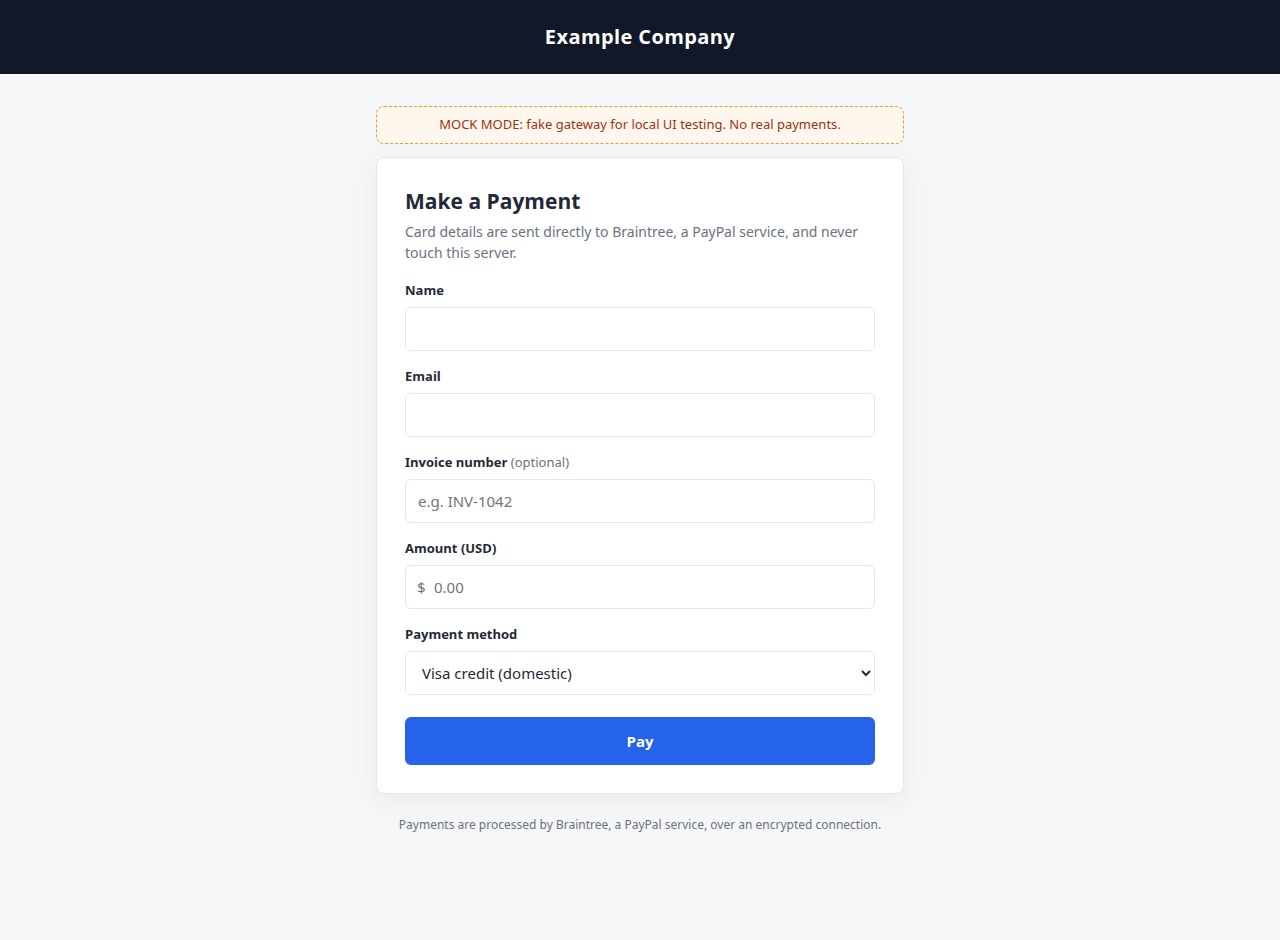
The page your customers see. Card details go straight to Braintree and never touch your server.
Please test before relying on it
This is shared as-is, with no warranty. It works on my own computers, but your system, settings and software versions may differ, so please try it in a safe setting first. If something doesn't work, you can ask Claude (or another AI coding assistant) to look into it, and I'd appreciate hearing what you found and how you fixed it. You are also welcome to just let me know at support@veered.org, and I'll look into it.
Features
- Braintree Drop-in UI (card, PayPal, Venmo, Apple Pay, Google Pay; each one can be switched on or off)
- Server-side sale with
submitForSettlement, through the officialbraintree/braintree_phpSDK - Payer name, email, optional reference field (for example an invoice number) and amount, with a
?amount=prefill - Neutral receipt page, plus an optional notification email to you and a receipt email to the payer
- Theme based on CSS variables, with an optional logo
- Optional card surcharge: off by default, with configurable rates, recomputed on the server (read the warning)
- Hardening: CSRF token, strict server-side amount validation, the confirmed total must match the server's total, single-use nonces, post/redirect/get receipt, output escaping, email header-injection guards, per-IP rate limit, HTTPS enforcement, and
frame-ancestors 'none' - A mock gateway so you can test the UI locally without Braintree
Information for nerds: requirements, setup and every setting
- PHP 8.1 or newer, with
curl,openssl,xmlwriter,simplexml,domandhash(the Braintree SDK needs these) - HTTPS in production
- A Braintree account (the sandbox is free)
Setup
1. Get the code and the SDK
With Composer (recommended)
git clone https://github.com/veered-org/redwood-braintree-checkout.git
cd braintree-checkout
composer install --no-dev
cp config.example.php config.php
Without Composer
- Download the latest release of braintree/braintree_php (for example the
6.xsource zip). - Extract it so that this file exists:
lib/braintree_php/lib/autoload.php. To use another location, setsdk_autoloadinconfig.phpto the full path of thatautoload.php. cp config.example.php config.php
2. Point the web server at public/
Only public/ should be reachable from the web. config.php, src/, vendor/ and storage/ all live outside it. If your host can only serve the repository root, the included .htaccess blocks everything outside public/ on Apache with mod_rewrite. Verify that /config.php and /storage/ return 403 or 404.
storage/ (or whatever storage_dir points to) must be writable by PHP.
3. Create a sandbox account and keys
- Sign up at <https://sandbox.braintreegateway.com/>.
- Open Settings (gear) → API → API Keys, then generate or view a key. Copy the Merchant ID, Public Key and Private Key into
config.php. - Leave
environmentset tosandbox. - If you have more than one merchant account (for example one per currency), copy the Merchant Account ID from Settings → Business into
merchant_account_id, and setcurrencyto match it.
4. Enable payment methods in the control panel
Drop-in only shows a method that is enabled in both places: in config.php → payment_methods and in your Braintree gateway.
- Cards: enabled by default. Consider AVS and CVV rules under Settings → Processing → Fraud Management.
- PayPal: link a PayPal account under Settings → Processing → Payment Methods.
- Venmo: enable it in the same place (US only; limited browser support).
- Apple Pay: enable it and register and verify your domain (host the domain association file under
/.well-known/). - Google Pay: enable it. Production also needs a Google Pay merchant ID from the Google Pay & Wallet Console; put it in
google_pay_merchant_id. - Card type indicators (debit/prepaid/country BIN data) are needed for the surcharge feature. If
binDatacomes back asUnknown, ask Braintree support to enable them.
5. Try it
Browse to your page, enter an amount and use Braintree's sandbox test card numbers (for example 4111 1111 1111 1111, any future expiry). Check the transaction in the sandbox control panel.
Local UI testing with the mock gateway
environment => 'mock' swaps Braintree for a fake in-process gateway. Drop-in is replaced by a select list of fake payment methods (domestic credit, domestic debit, foreign cards, PayPal, and a card that is declined). It is for local UI testing only. It refuses to run except under PHP's built-in server, or when BTCHECKOUT_ALLOW_MOCK=1 is set.
php -S 127.0.0.1:8000 -t public     # with environment => 'mock' in config.php
php tests/fees_test.php             # unit tests: money parsing and surcharge rules
tests/smoke.sh 8765                 # end-to-end curl tests against the mock, with a throwaway config
Going live checklist
- [ ] Every flow tested in sandbox: success, decline, validation errors, every wallet you enable
- [ ] Served over HTTPS with a valid certificate;
require_httpsstaystrue - [ ] Document root is
public/, andconfig.php/storage/are not reachable over HTTP - [ ]
config.phpis not in git (git statusdoes not show it) and is readable only by the web user (chmod 600) - [ ] Production API keys created in the production control panel; the sandbox keys are not reused
- [ ]
environment => 'production'and the productionmerchant_account_id/currency - [ ] Production payment methods enabled, Apple Pay domain verified, Google Pay merchant ID set
- [ ] Fraud tools reviewed (AVS/CVV rules, Advanced Fraud Protection, and 3-D Secure if you need SCA; 3DS is not wired in by this page)
- [ ]
dropin_versionpinned; optionaldropin_sriset (see below) - [ ]
mail.from_emailon a domain whose SPF/DKIM/DMARC covers this server; one real notification received - [ ] If the surcharge is enabled: legal review done, card-network registration and notice completed
- [ ] One small real transaction run, then refunded or voided from the control panel
- [ ] Web server or WAF rate limiting in place (see Security)
Configuration reference
All keys live in config.php. Any key you leave out falls back to config.example.php.
| Key | Default | Meaning |
|---|---|---|
environment | sandbox | sandbox, production or mock (local UI testing only) |
merchant_id, public_key, private_key | '' | API credentials from the control panel |
merchant_account_id | '' | Optional. Selects the merchant account, and therefore the currency |
sdk_autoload | '' | Path to the SDK autoloader if not using vendor/ or lib/braintree_php/ |
business_name | Example Company | Shown in the header, titles, emails and wallet sheets |
logo_url | '' | Optional header logo (replaces the text name) |
page_title, intro_text, footer_text | Page copy (plain text; escaped) | |
return_url | '' | "Return to …" link on the receipt (https://… or /path) |
noindex | true | Adds robots noindex, nofollow (meta tag and header) |
theme.accent, theme.accent_text, theme.header_bg, theme.header_text | neutral | Hex colors; more variables in public/assets/style.css |
currency, currency_symbol | USD, $ | Must match the merchant account |
min_amount, max_amount | 1.00, 10000.00 | Enforced on the server |
reference_enabled, reference_required, reference_label, reference_placeholder | on, optional, Invoice number | Free-text reference, sent to Braintree as orderId (up to 50 characters) |
payment_methods.card / paypal / venmo / apple_pay / google_pay | card only | Drop-in methods to offer |
google_pay_merchant_id | '' | Needed for production Google Pay |
apple_pay_display_name | business name | Apple Pay sheet label |
dropin_version | 1.44.1 | Drop-in JS version from js.braintreegateway.com |
dropin_sri | '' | Optional sha384-… integrity hash |
notify_emails | [] | Addresses notified of each successful payment |
send_payer_receipt | true | Email a receipt to the payer |
mail.transport | mail | mail, smtp (needs composer require phpmailer/phpmailer), log, none |
mail.from_email, mail.from_name, mail.reply_to | Sender details | |
mail.smtp.host / port / encryption / username / password | SMTP settings | |
surcharge.* | disabled | See below |
require_https | true | Refuse plain-HTTP requests (ignored in mock mode) |
trust_proxy | false | Honor X-Forwarded-Proto / X-Forwarded-For |
rate_limit.max_attempts, rate_limit.window_seconds | 10, 900 | Checkout attempts per IP |
storage_dir | ./storage | Writable, outside the web root |
Drop-in version and SRI
Braintree serves Drop-in from https://js.braintreegateway.com/web/dropin/<version>/js/dropin.min.js. Pin a version, read the Drop-in changelog before you bump it, and test in sandbox. Braintree does not publish SRI hashes, so if you want Subresource Integrity, compute the hash yourself for the exact version you pinned:
curl -s https://js.braintreegateway.com/web/dropin/1.44.1/js/dropin.min.js \
  | openssl dgst -sha384 -binary | openssl base64 -A
Put sha384-<output> in dropin_sri. Drop-in loads further scripts at runtime (for example braintree-web modules and PayPal/Google SDKs), and SRI does not cover those.
Optional card surcharge
[!CAUTION] Compliance warning. This is not legal advice. Surcharging card payments is heavily regulated, and the rules change. Among other things: - Card network rules. Visa, Mastercard and others require you to register or notify the network and/or your acquirer (typically at least 30 days in advance), disclose the surcharge at the point of entry and at the point of sale, show it as a separate line on the receipt, and keep it under a cap (commonly the lower of your actual cost of acceptance and a network maximum, around 3%). Rules differ for American Express, Discover and others. - Debit and prepaid cards may not be surcharged in the United States, even when run as credit ("no surcharge on debit" rules and the Durbin amendment framework). This code never surcharges domestic debit or prepaid cards. **Foreign debit (
foreign_debit) is off by default; do not turn it on without specific advice. - State and national laws. Several US states restrict or prohibit surcharges or cap them, some require specific disclosures, and other countries have their own rules (for example, the EU bans surcharges on most consumer cards). - Wallets and PayPal.** PayPal, Venmo, Apple Pay and Google Pay have their own terms. This page never surcharges them. Get advice from a lawyer and your processor before you enable this feature. You are responsible for compliance.
How it works:
- The payer clicks Review payment. Drop-in tokenizes the payment method, and the browser shows an itemized total using
binData(debit, prepaid, country of issuance). This is display only. - The payer clicks Confirm and pay. The form posts the nonce, the base amount and the total the payer saw.
- The server looks the nonce up with Braintree (
paymentMethodNonce()->find()) and recomputes the fee from that BIN data. A fee or total sent by the browser is never trusted. If the server's total differs from the confirmed one in either direction, nothing is charged, and the payer is asked to review again.
Rules (surcharge.*):
| Card | Surcharged? |
|---|---|
Credit, issued in home_country (or unknown country) | if domestic_credit (rate percent) |
| Credit, issued elsewhere | if foreign_credit (rate foreign_percent, or percent) |
Debit or prepaid, issued in home_country | never |
| Debit or prepaid, issued elsewhere | only if foreign_debit (off by default) |
| Unknown funding type, lookup failure | never |
| PayPal, Venmo, Apple Pay, Google Pay | never |
fee = round(amount × percent / 100) + fixed, then capped at max_percent of the amount (default cap 3%).
Security notes
- Card data never touches your server. Drop-in collects card details in Braintree-hosted iframes and returns a single-use nonce, which keeps you in the lightest PCI scope (SAQ A in most setups; confirm with your acquirer).
- Amounts are parsed strictly into integer cents and checked against
min_amount/max_amounton the server. The browser's checks are only a convenience. - CSRF. Every form render issues a token that is valid for one POST.
- Nonces are single use at Braintree. This page also refuses a nonce that was already submitted in the same session.
- Double submits and refreshes. Checkout redirects (303) to a receipt read from the session, so reloading never charges twice.
- XSS. All output is HTML-escaped, and the configuration for the front-end script is JSON-encoded with
JSON_HEX_*flags. - Email. Addresses are validated and must not contain CR/LF; names and subjects have control characters stripped; non-ASCII headers are RFC 2047 encoded. The payer's address is used only as a recipient and never as
From. - Logging. Only exception class names are logged. No request bodies, nonces or card data are logged, and this page never sees a PAN.
- Rate limiting. A simple per-IP file counter limits checkout POSTs. Also add web-server or WAF limits (for example nginx
limit_req, Cloudflare rate rules) to deter card testing. Braintree's fraud tools help here too. - Headers.
frame-ancestors 'none',X-Frame-Options: DENY,nosniff,no-store, and HSTS when on HTTPS. If you add a full Content-Security-Policy, allow Braintree, PayPal and Google Pay origins as their docs describe. - Session cookie is
HttpOnly,SameSite=Lax, andSecureover HTTPS.
Email deliverability
mail() hands mail to the server's local MTA. Many shared hosts send that mail with poor reputation or misaligned SPF/DMARC, so receipts can land in spam. For reliable delivery:
- Use a
from_emailon your own domain, with SPF and DKIM that authorize the sending server (the-fenvelope sender is set to match), or composer require phpmailer/phpmailerand setmail.transport => 'smtp'with an authenticated mailbox or transactional email provider, or- Turn on Braintree's own email receipts in the control panel and set
send_payer_receipt => false.
License
MIT © 2026 Veered